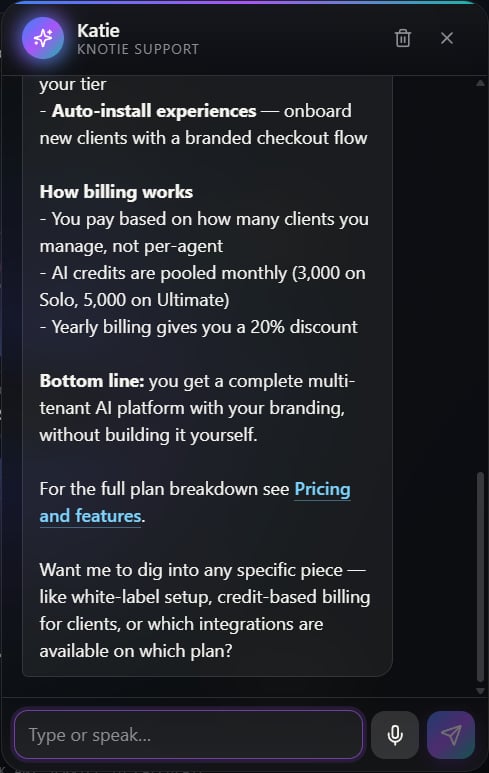
Meet Katie
Katie is the Knotie AI support agent. She’s available around the clock through a floating chat button that appears on:- The Knotie landing page — open to any visitor, no sign-in needed
- The Partner Portal — for logged-in partners, with answers tailored to what you’re working on

Opening the chat
Look for the round chat button in the bottom-right corner of the page. Click or tap it to open the chat panel.Using the chat
Typing a message
Type your question in the box at the bottom and press Enter or click send. Katie replies in real time — you’ll see her answer appear as she writes it.Talking instead of typing
Click the microphone icon next to the box to speak your question instead. Your browser turns your speech into text in the box, and you click send when you’re ready.Voice input works best in Chrome or Edge on a computer. Safari and Firefox have limited support, so if the mic isn’t there, just type your question instead.
Formatted answers
Katie’s replies come back nicely formatted — headings, bullet lists, bold text, and links all display properly. Links open in a new tab so you don’t lose your place in the chat.Fair-use limits
To keep things running smoothly, the chat has a light limit on how many messages you can send in a short burst. Signed-in partners get a higher allowance than anonymous visitors on the landing page. If you ever hit the limit, Katie tells you how long to wait, and it clears on its own.Troubleshooting
| Symptom | Likely cause | Fix |
|---|---|---|
| The chat button doesn’t appear | A browser extension is blocking scripts | Turn off ad blockers for this page, or try a private/incognito window |
| The mic icon is missing | Your browser doesn’t support voice input | Switch to Chrome or Edge, or simply type your question |
| The answer stops partway | Your message was too long | Break it into a few shorter messages |
| ”Support is not available right now” | The chat is temporarily offline | Try again in a few minutes, or email support@knotie-ai.pro |
Related pages
- Support Keyword Verification — How the support team confirms your identity during a conversation
- Partner Portal Dashboard — Your central hub once you’re signed in