

This page covers two features that build on top of the core Minds system: the Kick off wizard and the Connect to agents modal. If you haven’t set up AI Memory yet, start with AI Memory overview.
Kick off a Mind
A brand-new Mind is empty — Recall and Ask have nothing to work from. Kick off is a short guided wizard that collects a few stable facts about the customer (or agent) and remembers them in one go, so the very first interaction is useful.Where to find it
Select a Mind first, then use the Kick off button on the Mind detail panel:- Partner portal —
/partner/memory→ select a customer → select a Mind → Kick off. - Customer portal —
/whitelabel/memory→ select a Mind → Kick off.
How it works
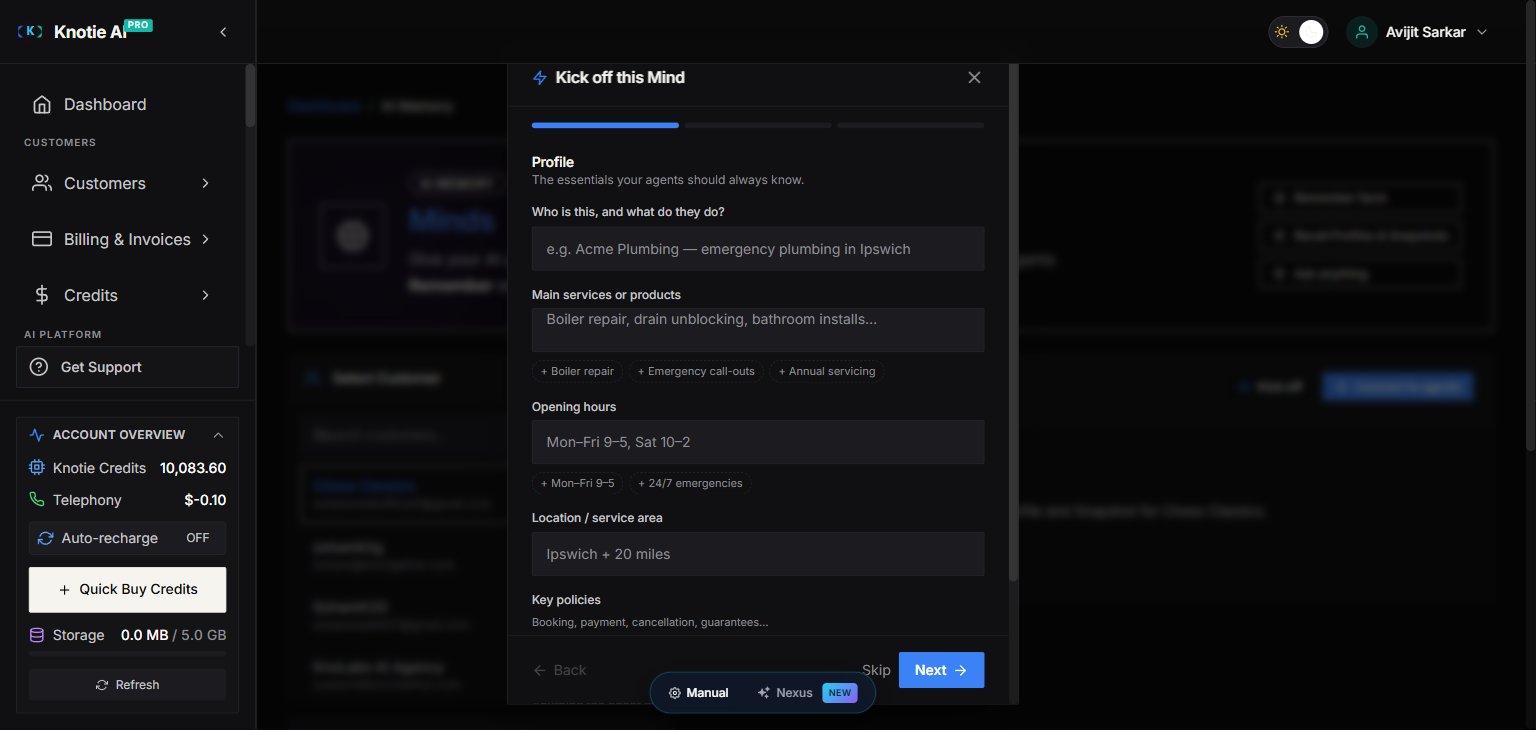
The wizard — titled Kick off this Mind — is a 3-step stepper:- Profile — “The essentials your agents should always know.” Questions cover identity and what they do, main services or products, opening hours, location / service area, key policies, and anything the agent must always or never do.
- Preferences — “How your Mind should communicate.” Pick a preferred tone (Friendly / Professional / Warm / Concise), best times or channels to reach them, language or accessibility needs, and when it should hand off to a human (Urgent issues / Billing / Complaints / Anything unusual).
- Review & remember — “These facts will be saved into the Mind. Go back to edit anything.” A summary of everything you answered. Click Remember facts to store them all in one operation.
Design notes
- Entirely optional — every question can be skipped. If you reach Review without answering anything, it shows “Nothing to save yet — go back and answer a few questions.”
- Choice questions render as clickable chips (e.g. tone, hand-off triggers) — no typing required.
- Text questions show a short input with example chips you can click to insert common answers (e.g. + Boiler repair, + Mon–Fri 9–5).
- Questions adapt to the Mind’s scope — a Customer Mind asks about the business; an Agent Mind asks about the agent’s role and boundaries.
Remember facts charges credits, the same as any Remember operation (partner Knotie Credits, plus customer AI Credits when enabled). Skipping the wizard or closing it before Review charges nothing.
Connect a Mind to your agents
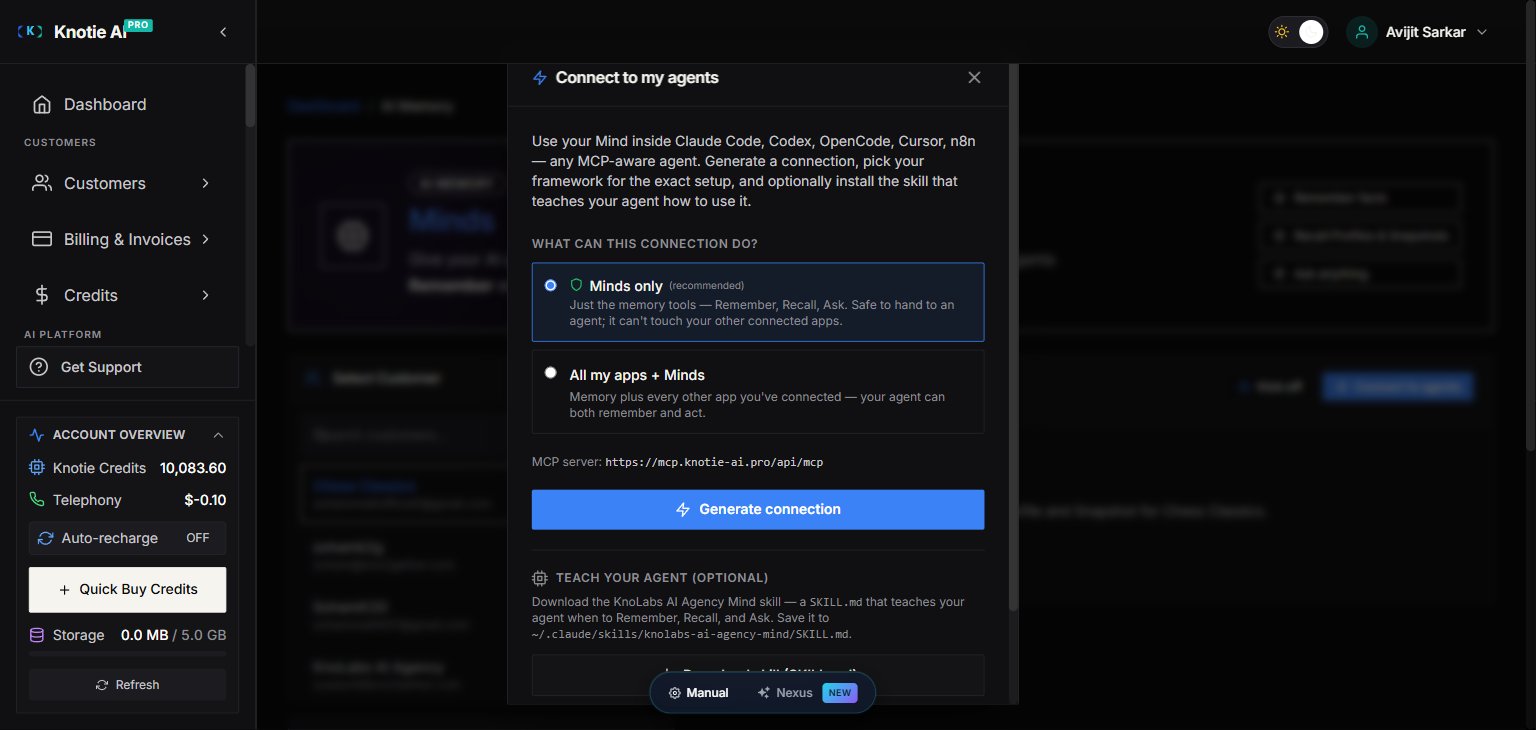
Connect to agents generates an MCP connection so any MCP-aware agent — Claude Code, Codex, OpenCode, Cursor, n8n, and more — can Remember, Recall, and Ask against the Mind.Where to find it
- Partner portal —
/partner/memory→ select a customer → select a Mind → Connect to agents. - Customer portal —
/whitelabel/memory→ select a Mind → the Connect to my agents card.
How it works
- Choose what the connection can do:
- Minds only (recommended) — just the memory tools (Remember, Recall, Ask). Safe to hand to an agent; it can’t touch your other connected apps.
- All my apps + Minds — memory plus every other app you’ve connected, so the agent can both remember and act.
- Click Generate connection. A one-time bearer token is created and the Set up your agent section appears.
- Pick your framework from the tabs — Any MCP agent, Claude Code, Codex CLI, OpenCode, Cursor, VS Code, n8n, OpenClaw, Hermes, or Pi. Each shows the exact setup for that client.
- Copy the connection. You get both the raw details (MCP server URL,
Streamable HTTPtransport, and anAuthorization: Bearer …header) and a ready-to-pastemcpServersconfig (JSON) block.
Teach your agent (optional)
The modal also offers two optional helpers for Claude Code users:- Download skill (SKILL.md) — a skill file that teaches your agent when to Remember, Recall, and Ask. Save it to
~/.claude/skills/<your-brand>-mind/SKILL.md. - Get slash commands (installer) — installs
:status,:remember,:recall, and:askslash commands for the Mind.
Customer-scoped vs agent-scoped Minds
For most use cases a Customer Mind works best — all of a customer’s agents share the same memory pool, so facts learned by one agent are available to the others.
Troubleshooting
Related pages
- AI Memory overview — enable Memory, create Minds, and use Remember / Recall / Ask
- Subscription plan features — enable AI Memory at the plan tier level
- MCP tokens — manage and revoke the tokens that Connect to agents generates
- MCP memory tools — the Remember / Recall / Ask tools your agent calls