

What the tool call quota does
The Tool Call Quota controls how many integration actions a customer can run within a set time window. It keeps usage fair and predictable, and stops a runaway workflow from burning through resources. “Tool calls” are the actions your customer’s integrations take on their behalf — for example, sending an email through a connected Gmail account, posting to Slack, updating a record in a CRM, or firing an automation.Where to find it
The Tool Call Quota tab only shows up once integrations are turned on for the customer.- Open Customers in the sidebar.
- Select a customer.
- Click Manage.
- Go to the Features & Add-ons tab.
- Turn on the Show Integration toggle.
- Choose which apps the customer can use.
- The Tool Call Quota tab now appears — open it.
What you’ll see
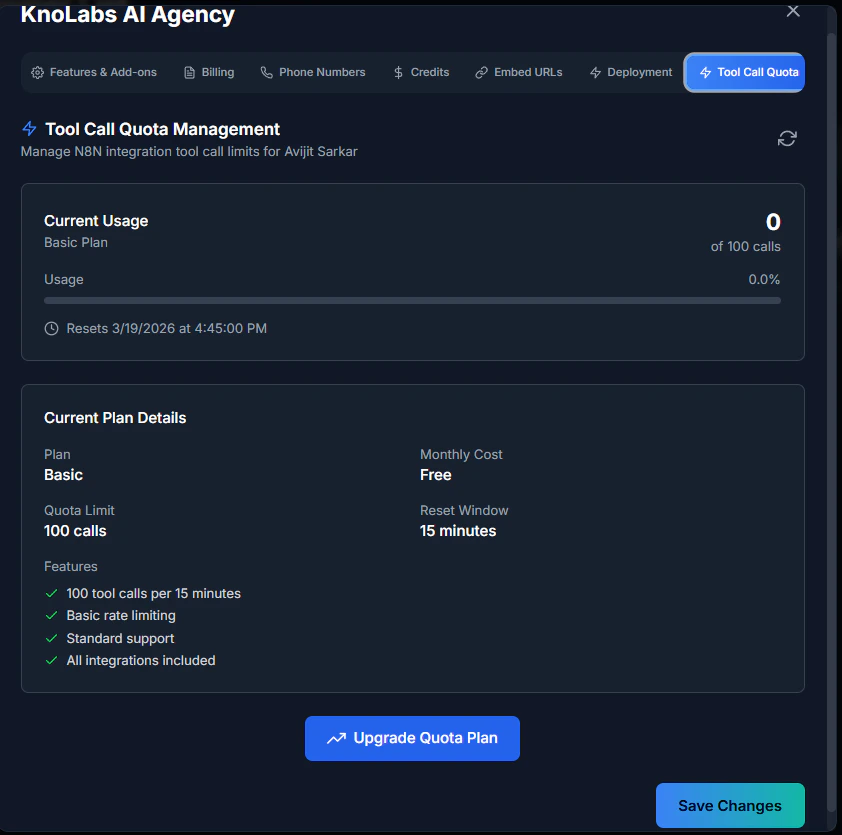
- Current usage — how many calls the customer has used so far, shown as a progress bar (for example, 0 of 100).
- Current plan details — the plan name, monthly cost, quota limit, reset window, and the features included.
- Upgrade Quota Plan — a button to move the customer to a higher plan.
How the quota works
Each time a customer’s integration runs an action, it adds one to their count for the current window. When they reach the limit, further actions pause until the window resets. Then the count goes back to zero and they can carry on. The window rolls continuously rather than resetting on the clock, and each customer has their own separate quota.Raising a customer’s quota
If a customer regularly reaches their limit — usually because they run a lot of automations or use several integrations at once — you can move them to a higher plan:- Open the Tool Call Quota tab for the customer.
- Click Upgrade Quota Plan.
- Choose the plan you want.
- Confirm. The new limit takes effect right away.
If a customer keeps hitting the limit
- Wait for the reset — the quota clears on its own at the end of the window.
- Move them to a higher plan — the simplest fix for customers who consistently need more room.
- Check for runaway usage — an automation stuck in a loop, or a flood of triggers, can eat through a quota quickly. It’s worth confirming the customer’s workflows are behaving as expected.
Related pages
- Integration apps selection — Choose which apps a customer can use
- Features & add-ons — Turn integrations on