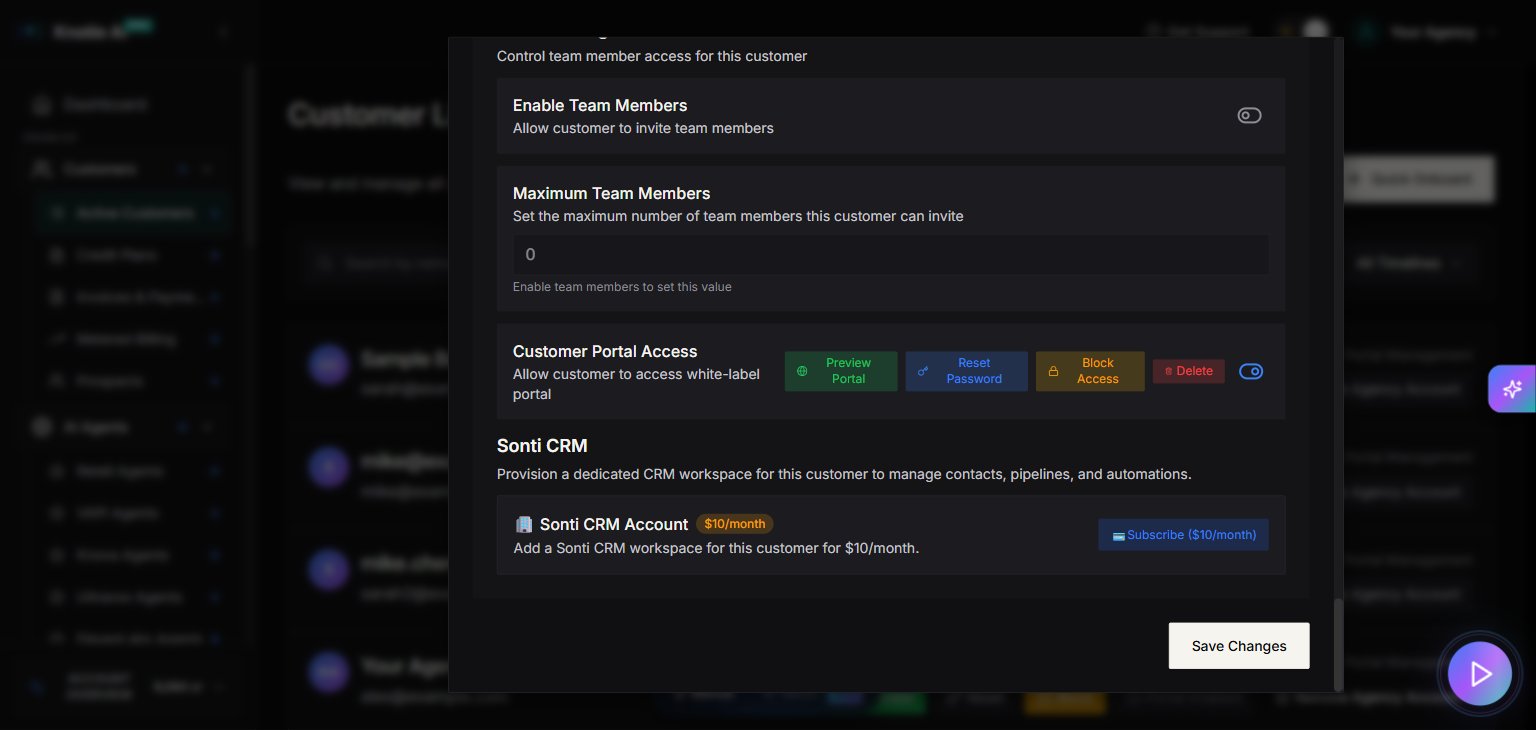
Open the access controls
- Open Customers → Active Customers.
- Select Manage for the customer.
- Open Features & Add-ons.
- Scroll to Customer Portal Access.
Preview the portal
Select Preview Portal to open the customer experience in a new window. The confirmation message tells you when the temporary preview expires. Allow pop-ups for your portal if the new window does not open. Preview mode is for checking the customer experience; password changes are not available from this temporary session.Help a customer with their password
Customers can change their own password from their portal settings. The signed-in flow asks for the current password before accepting a new one. If a customer cannot sign in, ask them to use the password-reset link on the sign-in page. You can also select Reset Password in the customer’s access controls.A first sign-in may require the customer to replace a temporary password before continuing.
Block or remove access
- Block Access prevents the customer from signing in until access is restored.
- Delete removes the customer’s portal access. Use it only when the account should no longer be available.
Sign-in troubleshooting
If the customer signs in and immediately returns to the sign-in page:- Confirm Enable Customer Portal is on for that customer.
- Confirm the branded portal and its domain are enabled under Settings → White-Label Portal.
- Open the secure portal address, beginning with https://, in a fresh browser window and try again.
- Clear saved site data for the portal or try a private window.
- If the issue continues, select Get Support and include the portal address and the time of the attempt. Never send the customer’s password.
Related pages
- Features, add-ons, and menu visibility
- Customer deletion requests
- Custom domains
- Customer onboarding