

Open Phone Numbers
Select Phone Numbers in the Partner Portal sidebar. The page shows ownership, customer, billing, assignment, provider, status, and capability filters. The summary cards show how many numbers are partner-owned, customer-owned, assigned, unassigned, ready for inbound calls, and imported.Buy a number
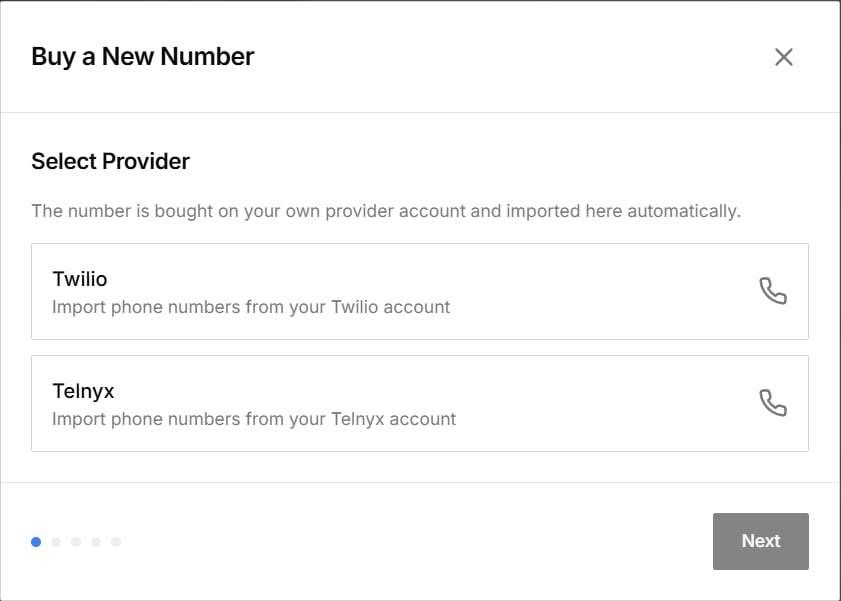
- Select Buy Number.
- Choose the provider account you want to use.
- Follow the prompts to connect the account and search for an available number.
- Review the number and any provider requirements shown in the purchase form.
- Confirm only when you are ready to buy.
Some countries or number types require a registered address or supporting documents. If the purchase form requests them, complete those steps before retrying.
Import existing numbers
- Select Import Numbers.
- Choose Twilio or Telnyx.
- Enter the requested account details.
- Select the numbers to import and confirm.
Assign a number to a customer
- Find the number in the list.
- Open its actions menu.
- Select the customer assignment action.
- Choose the customer and save.
Assign a number to an agent
- Open the number’s actions menu and select Assign Agent.
- Choose the AI agent.
- Select the available inbound or outbound options.
- Save.
Activate phone service
If the page shows Activate Phone Service, select Get Started and complete the requested business information, documents, and review steps. See Activate phone service for the full flow.Look up an inbound caller
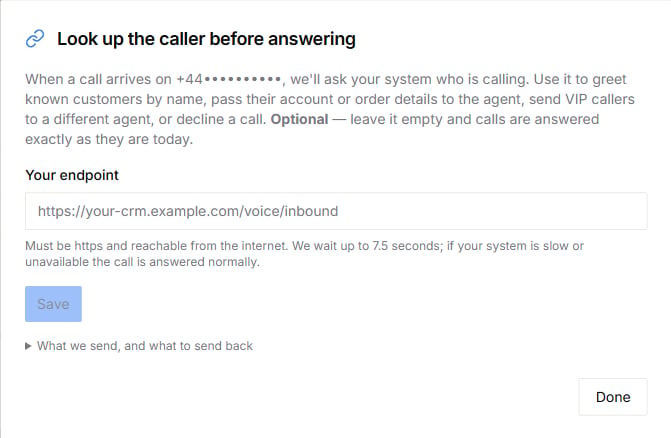
An assigned inbound number can show Caller lookup. Select it to let the portal ask your system who is calling before the agent answers. Use the result to greet a known customer, provide account or order details to the agent, route a caller to a different agent, or decline the call.- Select Caller lookup on the assigned number.
- Enter a public HTTPS address for your lookup service.
- Expand What we send, and what to send back for the current request and response format.
- Save the setting and test with a number you control.
Number pools and exports
- Select Number Pool to group numbers for campaign routing.
- Select Export to download the number list using the options shown in the portal.
Troubleshooting
- A search returns no results: broaden the country, type, area-code, or digit filters and try again.
- A purchase cannot continue: check the provider balance, credentials, and any address or document request shown in the form.
- Calls do not reach the agent: confirm the customer and agent assignments and the selected call direction.
- A number cannot be removed: unassign it from customers and agents first.
- A number remains in an unassigning state: wait for the current action to finish, refresh the page, and retry only after the number appears as unassigned. Contact support if the status does not change.