

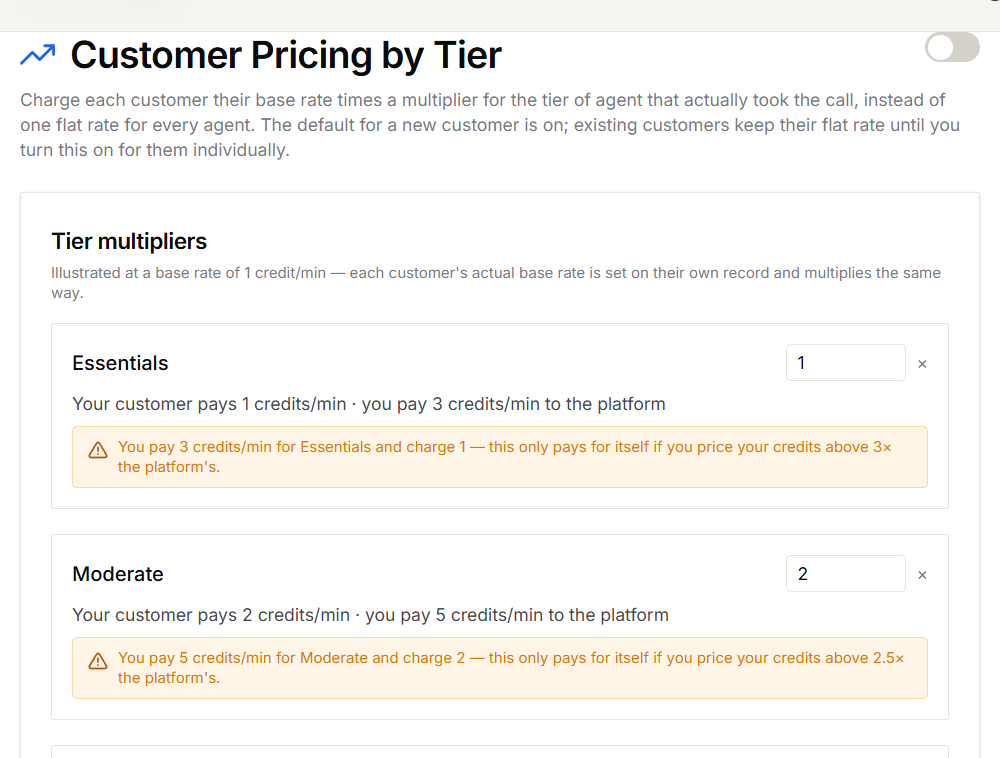
Set your multipliers
- In the Partner Portal, open Settings → Customer Pricing by Tier.
- Under Tier multipliers, enter a multiplier for each tier.
- Select Save.
Turn tier pricing on
Use the Charge customers by agent tier switch at the top of the page.- New customers start with tier pricing on.
- Existing customers keep their flat rate until you turn tier pricing on for them.
Change it for one customer
- Open Customers → Active Customers and select Manage for the customer.
- Open Features & Add-ons.
- Under AI Credit Management, turn Charge by agent tier on or off.
- Select Save Changes.
Common questions
What happens when tier pricing is off?
What happens when tier pricing is off?
The customer pays their flat rate for every call, whichever agent answers.
Does this apply to Retell, VAPI, and other providers?
Does this apply to Retell, VAPI, and other providers?
No. Tiers only exist for Knova agents. Calls handled by other providers are charged at the customer’s flat rate.
Can I see which rate was used for a call?
Can I see which rate was used for a call?
Yes. Each charge records the agent tier and the multiplier used, so you can explain any charge to a customer.