

Why tool modes exist
A voice-agent token withscope:'all' previously gave the LLM access to ~283 tools simultaneously (155 from ElevenLabs alone). This degraded tool-selection accuracy and added latency.
Meta mode solves this by giving the agent two gateway tools instead:
internal_search_tools— keyword-ranked search across all available tools (returns name + description)internal_execute_tool— generic executor: the agent passes a tool name + arguments and the platform dispatches it
Token types and their defaults
Voice agents default to
meta to protect LLM context and tool accuracy. Partner-minted tokens (Cursor, Claude Desktop, Windsurf, automation scripts) still receive full tool access by default.
JWT claims for fine-grained control
When minting a token manually you can include two optional claims:toolMode
"full" | "meta". Omitting the claim defaults to "full" for partner-minted tokens.
apps (limit the token to chosen apps)
allowedApps still works the same way; if you send both, apps wins. Leave both out to allow every app the token’s scope includes.
Mailbox access level
A token with access to all apps also includes the customer’s connected mailbox, if they have one. You can set how much it may do with themailboxAccessLevel option:
To keep a token away from email entirely, use
apps and leave the mailbox out of the list.
Setting these options in the portal
The Create Token tab in the Partner Portal covers the most common case. Its Tool Scope menu offers All apps and tools, Specific apps (the same asapps), and Specific tools.
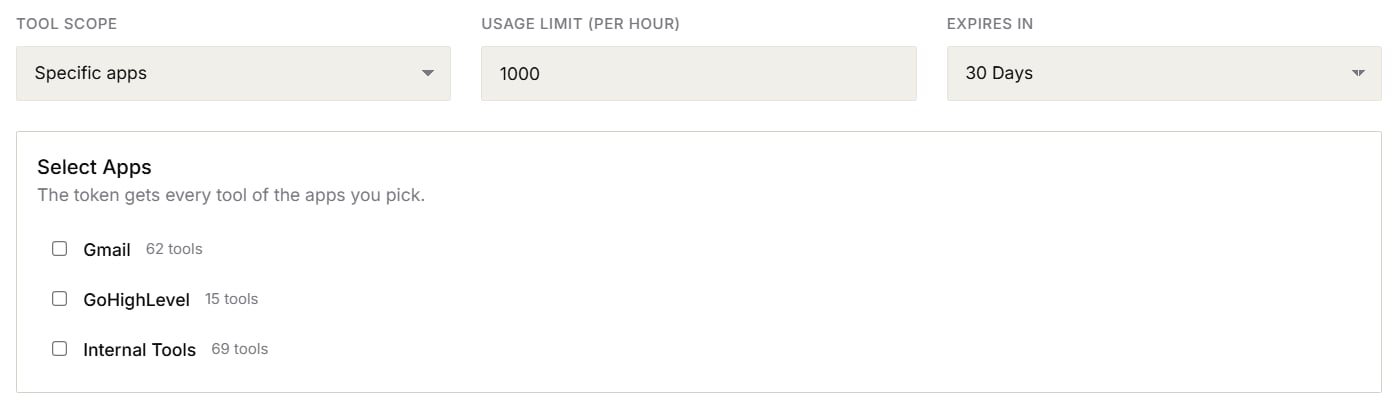
Tool Scope set to Specific apps in the MCP Token Manager
Meta mode (
toolMode) and the mailbox access level can only be set when you create a token through the API. Tokens created in the portal use full mode, and the default read level for the mailbox.How agents use meta mode
In meta mode the agent workflow changes:- Discover — call
internal_search_toolswith a keyword (e.g.,"social post") to get relevant tool names and descriptions. - Execute — call
internal_execute_toolwith the tool name and parameters. - Rate limits, credit charges, scope, and app-limit enforcement all apply inside
internal_execute_toolexactly as they do for direct tool calls.
Revert to full mode for voice agents
Voice-agent tool mode is a platform-level default managed by Knotie. If you need your voice agents to receive the full tool list (e.g., for debugging a tool-selection issue), contact Knotie support to have the default changed for your account. The change applies to newly minted voice-agent tokens; in-flight tokens are unaffected until the call ends.New agent-facing tools
The following tools are now available to agent tokens with appropriate scope:MEDIA_IMPORT_FROM_URL runs the URL through a safe-fetch validator (HTTPS-only, private/loopback IP rejection, ≤3 redirects) before downloading.
Related pages
- MCP tokens — Generate and manage partner MCP tokens.
- MCP API reference — Full endpoint documentation
- Social posting calendar — Schedule social posts via the portal or via agent tools
- Docs & Media library — Upload and manage media assets