> ## Documentation Index
> Fetch the complete documentation index at: https://docs.knotie-ai.pro/llms.txt
> Use this file to discover all available pages before exploring further.
# VPS App Catalog & Packages
> Purchase VPS servers, bundle apps, and manage customer deployments through the Partner Portal.
## What you can do
The **VPS** section of the Partner Portal lets you:
1. **Purchase VPS servers** for your customers (6 plan tiers, $6.98–$75.57/mo)
2. **Create App Packages** — bundle apps with a VPS plan and set your own customer price
3. **Reinstall instances** — swap the software stack on an existing VPS without destroying customer data
4. **Control visibility** — choose which plans your customers can see
***
## Purchasing a VPS
Navigate to **VPS Servers** from the Infrastructure section of the sidebar.
 ### Available plans
| Plan | vCPU | RAM | NVMe | Speed | Best for |
| ------------ | ---- | ----- | ------ | -------- | -------------------------------- |
| Cloud VPS 10 | 4 | 8 GB | 75 GB | 200 Mbps | Small projects, dev environments |
| Cloud VPS 20 | 6 | 12 GB | 100 GB | 400 Mbps | Web apps, databases |
| Cloud VPS 30 | 8 | 24 GB | 200 GB | 600 Mbps | Production workloads |
| Cloud VPS 40 | 12 | 48 GB | 250 GB | 800 Mbps | High-traffic, CI/CD |
| Cloud VPS 50 | 16 | 64 GB | 300 GB | 1 Gbps | Enterprise workloads |
| Cloud VPS 60 | 18 | 96 GB | 350 GB | 1 Gbps | AI workloads, large databases |
Click any plan card → choose region (EU/US) → assign to a customer (optional) → **Purchase VPS**.
***
## Managing Instances
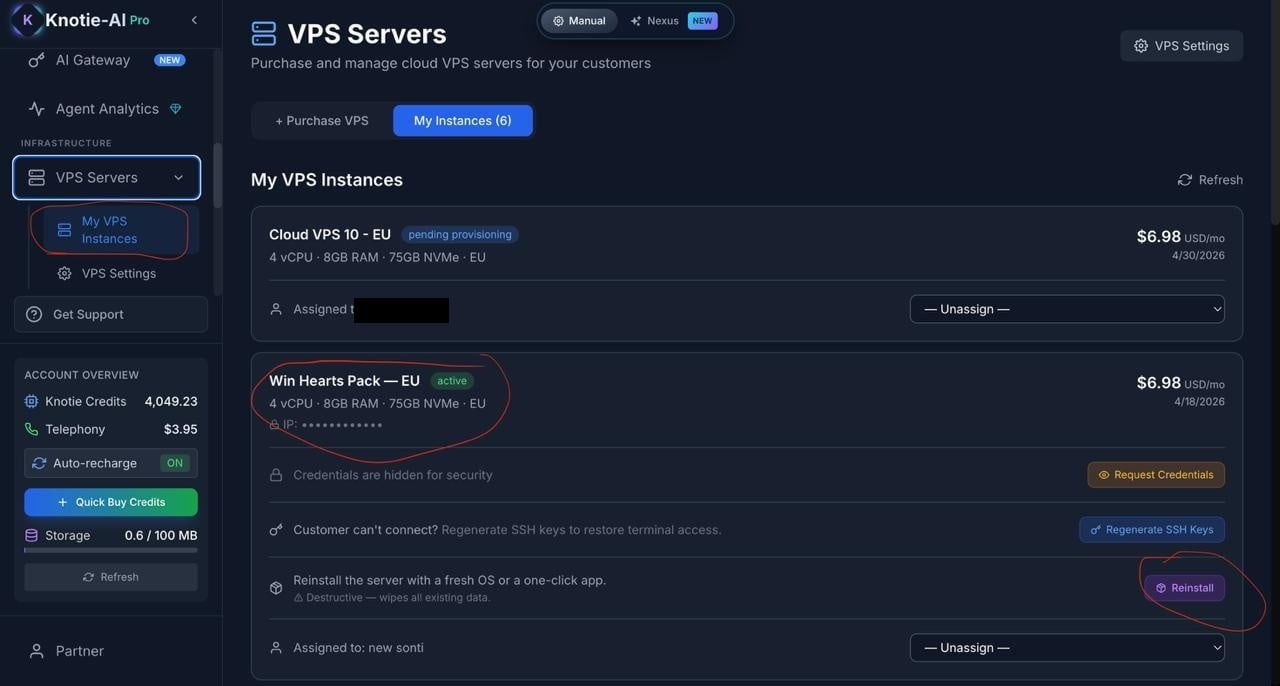
Switch to the **My Instances** tab to see your VPS servers.
Each instance card shows: name, IP address, status (Active / Suspended / Cancelled), which customer it's assigned to, and the monthly cost.
### Reinstalling with a new app or stack
Click **Reinstall** on any active instance to open the app selection modal.
### Available plans
| Plan | vCPU | RAM | NVMe | Speed | Best for |
| ------------ | ---- | ----- | ------ | -------- | -------------------------------- |
| Cloud VPS 10 | 4 | 8 GB | 75 GB | 200 Mbps | Small projects, dev environments |
| Cloud VPS 20 | 6 | 12 GB | 100 GB | 400 Mbps | Web apps, databases |
| Cloud VPS 30 | 8 | 24 GB | 200 GB | 600 Mbps | Production workloads |
| Cloud VPS 40 | 12 | 48 GB | 250 GB | 800 Mbps | High-traffic, CI/CD |
| Cloud VPS 50 | 16 | 64 GB | 300 GB | 1 Gbps | Enterprise workloads |
| Cloud VPS 60 | 18 | 96 GB | 350 GB | 1 Gbps | AI workloads, large databases |
Click any plan card → choose region (EU/US) → assign to a customer (optional) → **Purchase VPS**.
***
## Managing Instances
Switch to the **My Instances** tab to see your VPS servers.
Each instance card shows: name, IP address, status (Active / Suspended / Cancelled), which customer it's assigned to, and the monthly cost.
### Reinstalling with a new app or stack
Click **Reinstall** on any active instance to open the app selection modal.
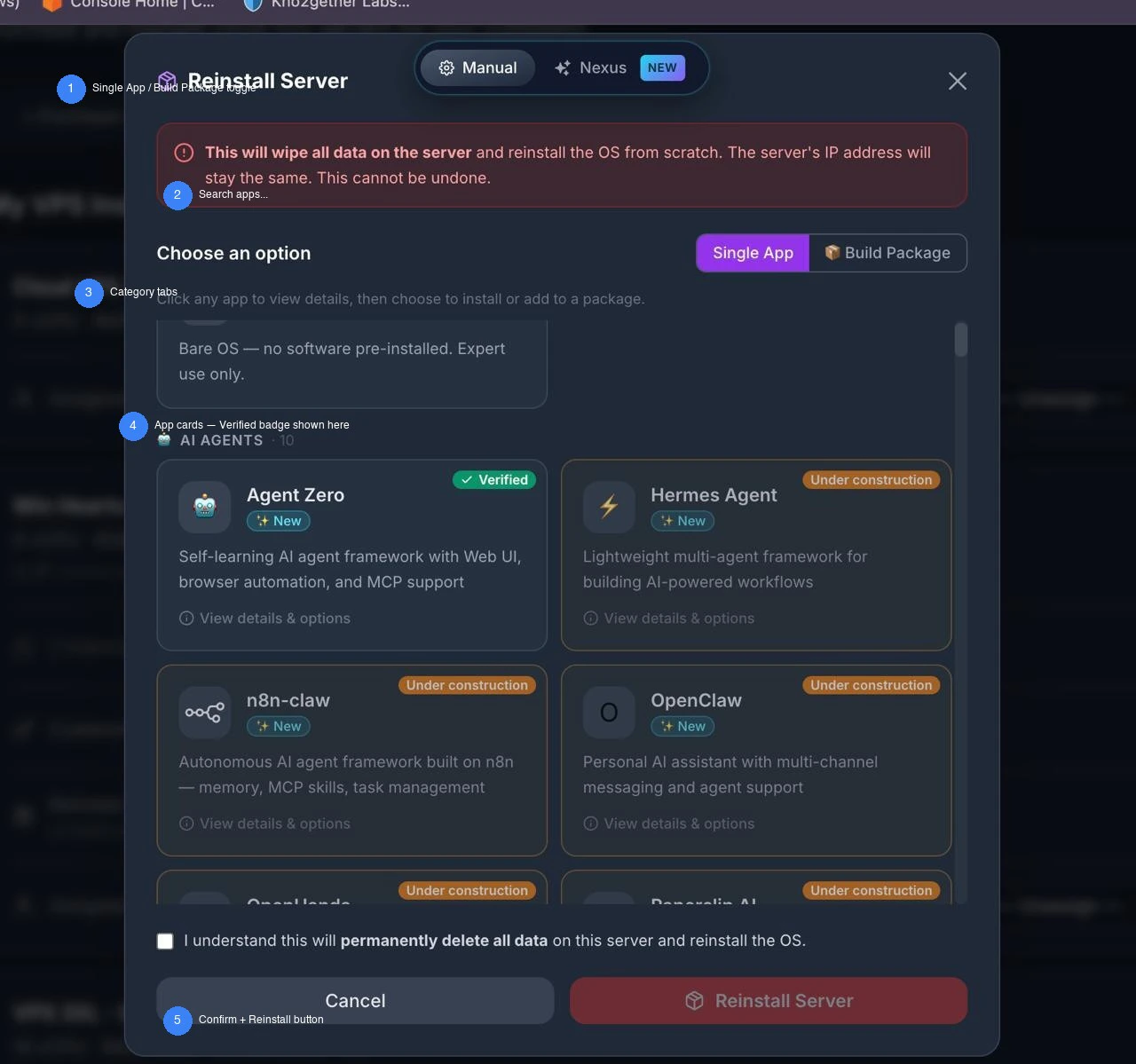 The modal has two modes — toggle between them at the top:
### Single App mode
Choose one application to install:
* **Clean Ubuntu** — bare OS, no software pre-installed. Expert use only.
* **Docker + Portainer** — the platform default stack. Installed on every new VPS unless you choose something else.
* Any other app from the catalog (OpenClaw, n8n, Ollama, Nextcloud, etc.)
Click any app card to open the detail overlay — showing description, features, resource usage (RAM), access port, website, and GitHub link.
Then click **Select for Install**.
### Build Package mode
Build a custom stack of multiple apps that install together. Useful for pre-configured offerings like "AI Agent Stack" (OpenClaw + Ollama + n8n).
* Click **+ Add to Package** on any app card
* Port conflicts are detected automatically and shown as a warning — apps sharing the same port cannot be installed together
* Total estimated RAM is shown based on selected apps
* Click **Remove (✕)** on a tag to unselect an app
### Confirm and reinstall
Both modes require you to:
1. Check the confirmation box: *"I understand this will permanently delete all data on this server and reinstall the OS."*
2. Click **Reinstall VPS**
The instance status changes to **Reinstalling** while the platform sets up the new software on the server.
***
## App Packages (VPS Settings)
> **Where to find App Packages:** Open **VPS Servers** in the sidebar, then click **VPS Settings**. Scroll past Enable VPS Purchase / Customer Margin / Display Currency / Plan Visibility — **App Packages** sits at the bottom of the same page (not a separate route).
In **VPS Settings → App Packages**, create pre-configured bundles you can offer customers as a single product.
The modal has two modes — toggle between them at the top:
### Single App mode
Choose one application to install:
* **Clean Ubuntu** — bare OS, no software pre-installed. Expert use only.
* **Docker + Portainer** — the platform default stack. Installed on every new VPS unless you choose something else.
* Any other app from the catalog (OpenClaw, n8n, Ollama, Nextcloud, etc.)
Click any app card to open the detail overlay — showing description, features, resource usage (RAM), access port, website, and GitHub link.
Then click **Select for Install**.
### Build Package mode
Build a custom stack of multiple apps that install together. Useful for pre-configured offerings like "AI Agent Stack" (OpenClaw + Ollama + n8n).
* Click **+ Add to Package** on any app card
* Port conflicts are detected automatically and shown as a warning — apps sharing the same port cannot be installed together
* Total estimated RAM is shown based on selected apps
* Click **Remove (✕)** on a tag to unselect an app
### Confirm and reinstall
Both modes require you to:
1. Check the confirmation box: *"I understand this will permanently delete all data on this server and reinstall the OS."*
2. Click **Reinstall VPS**
The instance status changes to **Reinstalling** while the platform sets up the new software on the server.
***
## App Packages (VPS Settings)
> **Where to find App Packages:** Open **VPS Servers** in the sidebar, then click **VPS Settings**. Scroll past Enable VPS Purchase / Customer Margin / Display Currency / Plan Visibility — **App Packages** sits at the bottom of the same page (not a separate route).
In **VPS Settings → App Packages**, create pre-configured bundles you can offer customers as a single product.
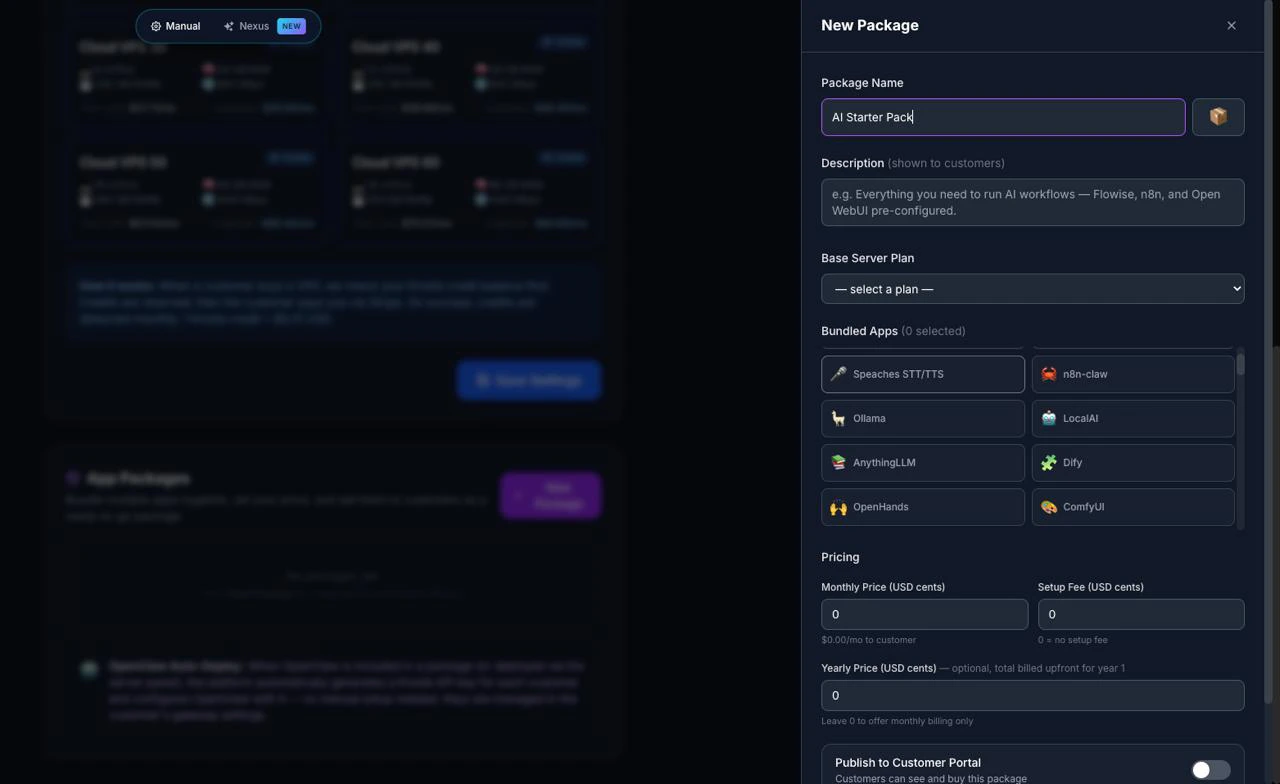
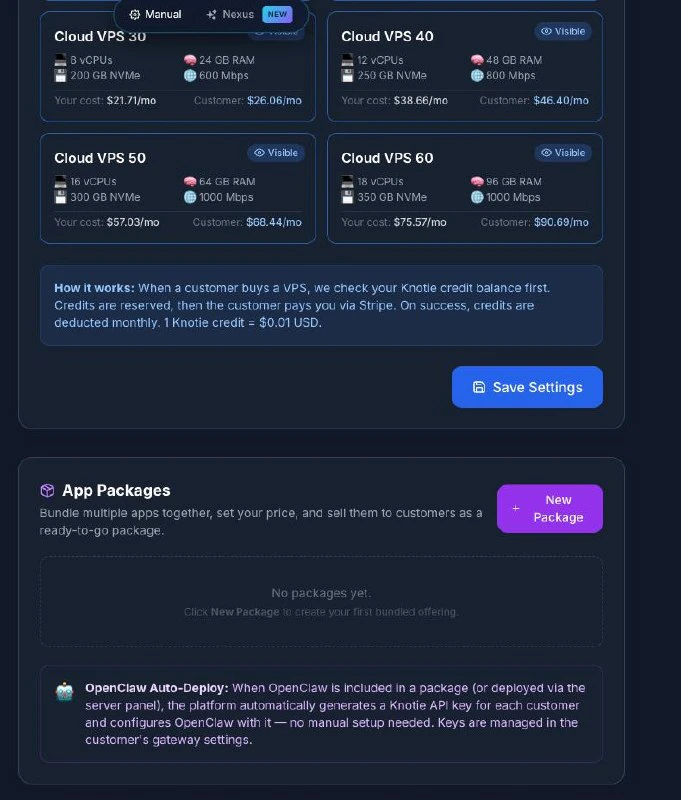 ### Create a package
1. Click **New Package** — a sidebar slides in from the right
2. Enter a **package name** — e.g. "AI Starter Stack", "Automation Pro"
3. Choose a **base VPS plan** to bundle with (e.g. Cloud VPS 10, 20, 30…)
4. Toggle which **apps** to include — OpenClaw is automatically provisioned with a Knotie API key for each customer
5. Set your **monthly/yearly price** — shown to customers in their whitelabel portal
6. Toggle **visibility** per plan (show on Cloud VPS 20+ but not VPS 10, for example)
7. Click **Save**
When a customer purchases a package from their portal, the platform automatically provisions all the apps and configures OpenClaw — no manual setup needed.
***
## VPS Settings
| Setting | What it does |
| ---------------------------- | --------------------------------------------------------------------------------------------------------------------------------------------- |
| **Enable VPS for Customers** | Toggle on/off — lets customers purchase VPS from their whitelabel portal |
| **Customer Margin (%)** | Markup on your partner cost. Example: Cloud VPS 10 costs you $6.98/mo. At 20% margin, customers see $8.38/mo. Can be overridden per customer. |
| **Display Currency** | Currency shown to customers (USD, GBP, EUR, AUD, CAD, SGD, INR). Your billing from Knotie is always in USD. |
| **Plan Visibility** | Choose which server plans customers can see. All 6 shown by default. |
***
## App Catalog (Full List)
When you click any app card in the reinstall modal, you see the full app detail view with:
* **Name + emoji/logo** — unique icon for the app
* **Description** — one-line summary of what the app does
* **Features** — key capabilities as bullet points
* **Tags** — searchable labels (e.g. `#llm`, `#chatbot`, `#automation`)
* **Resource estimate** — approximate RAM usage
* **Access port** — primary port the app listens on
* **License** — open source license (MIT, Apache 2.0, etc.)
* **Links** — official website and GitHub repository
### App status badges
Only one badge appears in the reinstall modal:
* **Platform default** — shown on the Docker + Portainer card (the default stack on every new VPS)
Other badges you may see in the full app catalog:
* **New** — app added to the platform within the last \~6 months
* **Popular** — widely used in the self-hosted ecosystem
* **Beta** — functional but not yet verified on a production VPS
***
## Related pages
* [OpenClaw Partner Setup](/agents/openclaw-setup) — Full setup guide for deploying OpenClaw on a VPS
* [VPS Terminal](/partner-portal/customers/vps-terminal) — Give customers browser-based SSH access
* [Auto Deploy](/partner-portal/auto-deploy) — Automated provisioning workflows
### Create a package
1. Click **New Package** — a sidebar slides in from the right
2. Enter a **package name** — e.g. "AI Starter Stack", "Automation Pro"
3. Choose a **base VPS plan** to bundle with (e.g. Cloud VPS 10, 20, 30…)
4. Toggle which **apps** to include — OpenClaw is automatically provisioned with a Knotie API key for each customer
5. Set your **monthly/yearly price** — shown to customers in their whitelabel portal
6. Toggle **visibility** per plan (show on Cloud VPS 20+ but not VPS 10, for example)
7. Click **Save**
When a customer purchases a package from their portal, the platform automatically provisions all the apps and configures OpenClaw — no manual setup needed.
***
## VPS Settings
| Setting | What it does |
| ---------------------------- | --------------------------------------------------------------------------------------------------------------------------------------------- |
| **Enable VPS for Customers** | Toggle on/off — lets customers purchase VPS from their whitelabel portal |
| **Customer Margin (%)** | Markup on your partner cost. Example: Cloud VPS 10 costs you $6.98/mo. At 20% margin, customers see $8.38/mo. Can be overridden per customer. |
| **Display Currency** | Currency shown to customers (USD, GBP, EUR, AUD, CAD, SGD, INR). Your billing from Knotie is always in USD. |
| **Plan Visibility** | Choose which server plans customers can see. All 6 shown by default. |
***
## App Catalog (Full List)
When you click any app card in the reinstall modal, you see the full app detail view with:
* **Name + emoji/logo** — unique icon for the app
* **Description** — one-line summary of what the app does
* **Features** — key capabilities as bullet points
* **Tags** — searchable labels (e.g. `#llm`, `#chatbot`, `#automation`)
* **Resource estimate** — approximate RAM usage
* **Access port** — primary port the app listens on
* **License** — open source license (MIT, Apache 2.0, etc.)
* **Links** — official website and GitHub repository
### App status badges
Only one badge appears in the reinstall modal:
* **Platform default** — shown on the Docker + Portainer card (the default stack on every new VPS)
Other badges you may see in the full app catalog:
* **New** — app added to the platform within the last \~6 months
* **Popular** — widely used in the self-hosted ecosystem
* **Beta** — functional but not yet verified on a production VPS
***
## Related pages
* [OpenClaw Partner Setup](/agents/openclaw-setup) — Full setup guide for deploying OpenClaw on a VPS
* [VPS Terminal](/partner-portal/customers/vps-terminal) — Give customers browser-based SSH access
* [Auto Deploy](/partner-portal/auto-deploy) — Automated provisioning workflows