> ## Documentation Index
> Fetch the complete documentation index at: https://docs.knotie-ai.pro/llms.txt
> Use this file to discover all available pages before exploring further.
# Subscription plan features
> Control exactly which platform features each subscription tier unlocks — analytics, menu visibility, knowledge-base processing, AI Memory, MCP access, team seats, VPS, and AI Credits — all from the plan modal's Features & Add-ons section.
## What this page covers
When you create or edit a **Subscription Plan**, the plan modal includes a **Features & Add-ons** section. This is where you configure which platform capabilities a customer automatically receives when they subscribe to that plan, so every new subscriber on a tier gets the right capabilities from day one — without you having to toggle them per customer after sign-up.
This page is the reference for that section. For the plan's basic fields (name, price, billing interval, landing-page visibility) and how to reach the modal, see [Subscription plans](/partner-portal/settings/subscription-plans).
## Where to find it
1. Open **Settings** in the Partner Portal sidebar.
2. Click **White-Label Portal**.
3. In the **Section Nav Rail**, click **Subscription Plans**.
4. Click **Create Plan** (or **Edit** on an existing plan).
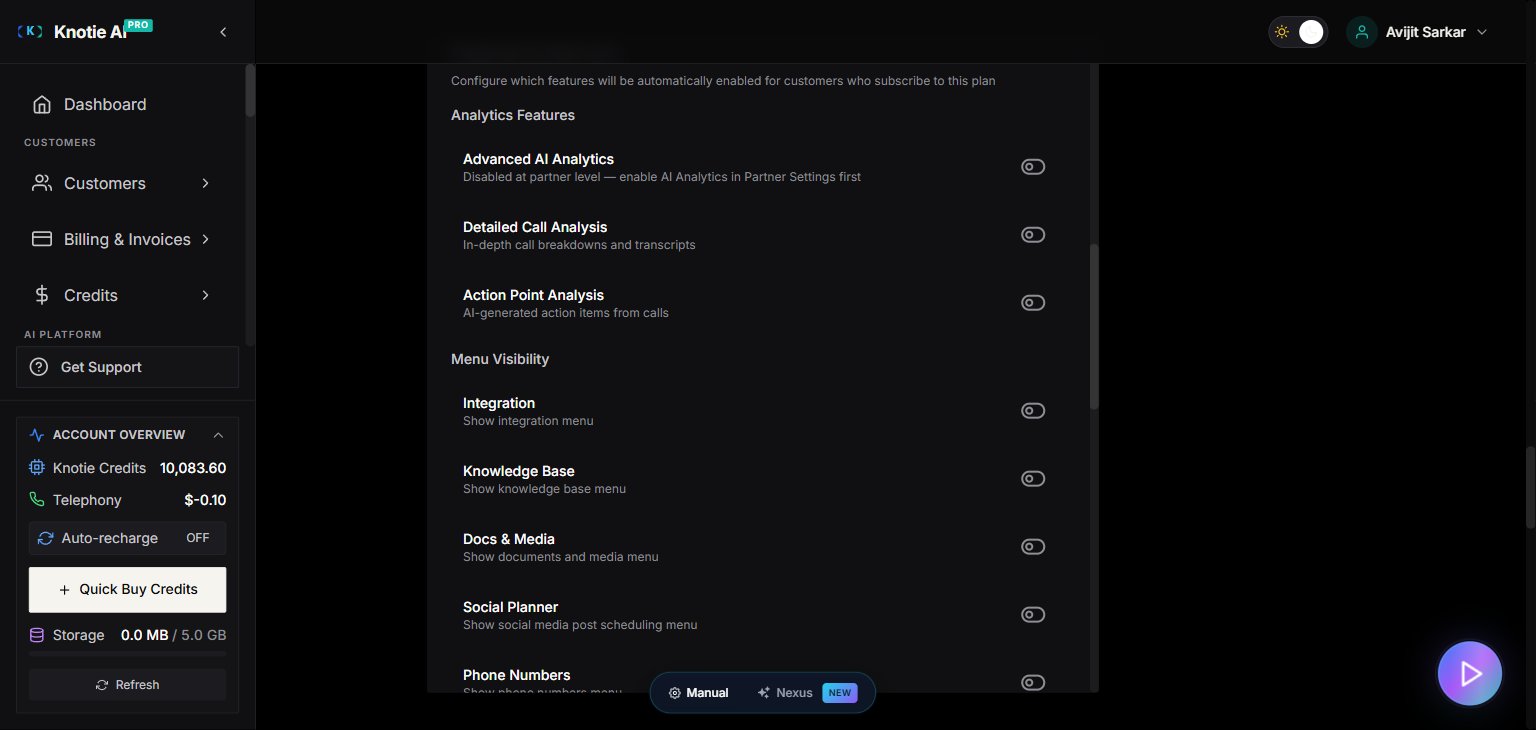
5. Scroll down to the **Features & Add-ons** section, below **Features (Display Text)**.
 ## How it works
When a customer subscribes to a plan (or you assign them one), Knotie applies the plan's feature settings to that customer's account. Updating a plan does **not** change existing customers — it only affects new subscribers from that point on.
You can always change individual features later for a single customer via the per-customer **Features & Add-ons** screen — see [Features & Add-ons per customer](/partner-portal/customers/features-addons-and-menu-visibility).
Every toggle starts **off** when you click **Create Plan**. When you edit an existing plan, its currently-saved values load into the modal — nothing is reset.
## Available toggles
The section is grouped by category. Each row is a single on/off toggle unless noted.
### Analytics Features
| Toggle | What it controls |
| -------------------------- | -------------------------------------------------------------------------------------------------------------------------------------------------------------------------------- |
| **Advanced AI Analytics** | Turns on the advanced analytics dashboard. Gated — shows *"Disabled at partner level — enable AI Analytics in Partner Settings first"* until you enable it at the partner level. |
| **Detailed Call Analysis** | In-depth call breakdowns and transcripts. |
| **Action Point Analysis** | AI-generated action items from calls. |
### Menu Visibility
| Toggle | What it controls |
| ----------------------------- | -------------------------------------------------- |
| **Integration** | Show the integration menu. |
| **Knowledge Base** | Show the knowledge base menu. |
| **Docs & Media** | Show the documents and media menu. |
| **Social Planner** | Show the social-media post-scheduling menu. |
| **Phone Numbers** | Show the phone numbers menu. |
| **Schedule Meeting** | Show the schedule-a-meeting menu. |
| **Pricing Information** | Show the pricing / cost breakdown to the customer. |
| **MCP Access** | Let the customer create their own MCP token. |
| **New Solutions Marketplace** | Show the app-marketplace "New Solutions" menu. |
Turning on **Docs & Media** (or **Knowledge Base**) reveals a **Default storage (MB)** field — *"Applied to new subscribers; overridable per customer."*
#### Knowledge Base Processing (revealed by Knowledge Base)
Enabling **Knowledge Base** expands a **Knowledge Base Processing** sub-group:
| Field | What it controls |
| ------------------------- | ------------------------------------------------------------------------------------------------------------------------------- |
| **KB Processing Enabled** | Allow knowledge-base ingestion for this customer. |
| **Auto-Embedding** | Automatically embed new KB assets (consumes credits). |
| **KB Ingestion Tier** | `Essential`, `Moderate`, or `Premium` — *"Drives parser quality for ingested documents."* Higher tiers cost more per embedding. |
### AI & Automation
| Toggle | What it controls |
| -------------------- | ------------------------------------------------------------------------------------------------------------------------------------------------------------------------------------------- |
| **AI Gateway** | Lets the customer generate their own AI Gateway API keys. Gated — shows *"Disabled at partner level — enable the AI Gateway in Partner Settings first"* until enabled at the partner level. |
| **AI Memory (Mind)** | Persistent per-customer / per-agent memory bank. Requires partner-level AI Memory. See [AI Memory](/partner-portal/ai-memory). |
### API Access
| Toggle | What it controls |
| ---------------------- | --------------------------------------------------------------- |
| **API Access Enabled** | Allow the customer to use the public API. |
| **API Keys Menu** | Show the API Keys menu — requires **API Access Enabled** first. |
### Team Management
| Toggle | What it controls |
| ---------------- | ------------------------------------- |
| **Team Members** | Let the customer invite team members. |
Turning on **Team Members** reveals a **Max team members** field — *"Seat cap applied to new subscribers; overridable per customer."* Leave it blank for no cap.
### Servers & Infrastructure
| Toggle | What it controls |
| ------------------------- | -------------------------------------------------------- |
| **Server Terminal (BYO)** | Show the bring-your-own VPS terminal. |
| **Managed VPS Purchase** | Let the customer buy managed VPS servers via the portal. |
### AI Credits
| Toggle | What it controls |
| ---------------------- | ----------------------------------------------------- |
| **AI Credits Enabled** | Enable the AI-credit billing system for the customer. |
When **AI Credits Enabled** is on, additional fields appear:
| Field | What it controls |
| ------------------------------------------------------- | -------------------------------------------------------------------------------------------- |
| **Initial AI Credits** | One-time credit grant when the customer first onboards with this plan. |
| **Low Credit Notifications** → **Enable Notifications** | Send whitelabel email alerts when the customer's AI credits run low. |
| **Low Credit Threshold** | The customer receives an email when their AI credit balance reaches this threshold or below. |
## Tips
If you add a feature to a plan and want existing subscribers to have it, update each customer individually via [Customer Management → Features & Add-ons](/partner-portal/customers/features-addons-and-menu-visibility). Editing the plan alone won't back-fill existing accounts.
The **Advanced AI Analytics**, **AI Gateway**, and **AI Memory (Mind)** toggles only take effect if you've enabled those features at the **partner level** first. A gated toggle shows a *"Disabled at partner level…"* note until then.
## Related pages
* [Subscription plans](/partner-portal/settings/subscription-plans) — basic plan fields, pricing, and landing-page visibility
* [Features & Add-ons per customer](/partner-portal/customers/features-addons-and-menu-visibility) — override plan features for individual customers
* [Customer credit plans](/partner-portal/settings/customer-credit-plans) — pay-as-you-go credit packs (separate from subscription plans)
* [AI Memory](/partner-portal/ai-memory) — enable AI Memory at the partner level before using it in plans
## How it works
When a customer subscribes to a plan (or you assign them one), Knotie applies the plan's feature settings to that customer's account. Updating a plan does **not** change existing customers — it only affects new subscribers from that point on.
You can always change individual features later for a single customer via the per-customer **Features & Add-ons** screen — see [Features & Add-ons per customer](/partner-portal/customers/features-addons-and-menu-visibility).
Every toggle starts **off** when you click **Create Plan**. When you edit an existing plan, its currently-saved values load into the modal — nothing is reset.
## Available toggles
The section is grouped by category. Each row is a single on/off toggle unless noted.
### Analytics Features
| Toggle | What it controls |
| -------------------------- | -------------------------------------------------------------------------------------------------------------------------------------------------------------------------------- |
| **Advanced AI Analytics** | Turns on the advanced analytics dashboard. Gated — shows *"Disabled at partner level — enable AI Analytics in Partner Settings first"* until you enable it at the partner level. |
| **Detailed Call Analysis** | In-depth call breakdowns and transcripts. |
| **Action Point Analysis** | AI-generated action items from calls. |
### Menu Visibility
| Toggle | What it controls |
| ----------------------------- | -------------------------------------------------- |
| **Integration** | Show the integration menu. |
| **Knowledge Base** | Show the knowledge base menu. |
| **Docs & Media** | Show the documents and media menu. |
| **Social Planner** | Show the social-media post-scheduling menu. |
| **Phone Numbers** | Show the phone numbers menu. |
| **Schedule Meeting** | Show the schedule-a-meeting menu. |
| **Pricing Information** | Show the pricing / cost breakdown to the customer. |
| **MCP Access** | Let the customer create their own MCP token. |
| **New Solutions Marketplace** | Show the app-marketplace "New Solutions" menu. |
Turning on **Docs & Media** (or **Knowledge Base**) reveals a **Default storage (MB)** field — *"Applied to new subscribers; overridable per customer."*
#### Knowledge Base Processing (revealed by Knowledge Base)
Enabling **Knowledge Base** expands a **Knowledge Base Processing** sub-group:
| Field | What it controls |
| ------------------------- | ------------------------------------------------------------------------------------------------------------------------------- |
| **KB Processing Enabled** | Allow knowledge-base ingestion for this customer. |
| **Auto-Embedding** | Automatically embed new KB assets (consumes credits). |
| **KB Ingestion Tier** | `Essential`, `Moderate`, or `Premium` — *"Drives parser quality for ingested documents."* Higher tiers cost more per embedding. |
### AI & Automation
| Toggle | What it controls |
| -------------------- | ------------------------------------------------------------------------------------------------------------------------------------------------------------------------------------------- |
| **AI Gateway** | Lets the customer generate their own AI Gateway API keys. Gated — shows *"Disabled at partner level — enable the AI Gateway in Partner Settings first"* until enabled at the partner level. |
| **AI Memory (Mind)** | Persistent per-customer / per-agent memory bank. Requires partner-level AI Memory. See [AI Memory](/partner-portal/ai-memory). |
### API Access
| Toggle | What it controls |
| ---------------------- | --------------------------------------------------------------- |
| **API Access Enabled** | Allow the customer to use the public API. |
| **API Keys Menu** | Show the API Keys menu — requires **API Access Enabled** first. |
### Team Management
| Toggle | What it controls |
| ---------------- | ------------------------------------- |
| **Team Members** | Let the customer invite team members. |
Turning on **Team Members** reveals a **Max team members** field — *"Seat cap applied to new subscribers; overridable per customer."* Leave it blank for no cap.
### Servers & Infrastructure
| Toggle | What it controls |
| ------------------------- | -------------------------------------------------------- |
| **Server Terminal (BYO)** | Show the bring-your-own VPS terminal. |
| **Managed VPS Purchase** | Let the customer buy managed VPS servers via the portal. |
### AI Credits
| Toggle | What it controls |
| ---------------------- | ----------------------------------------------------- |
| **AI Credits Enabled** | Enable the AI-credit billing system for the customer. |
When **AI Credits Enabled** is on, additional fields appear:
| Field | What it controls |
| ------------------------------------------------------- | -------------------------------------------------------------------------------------------- |
| **Initial AI Credits** | One-time credit grant when the customer first onboards with this plan. |
| **Low Credit Notifications** → **Enable Notifications** | Send whitelabel email alerts when the customer's AI credits run low. |
| **Low Credit Threshold** | The customer receives an email when their AI credit balance reaches this threshold or below. |
## Tips
If you add a feature to a plan and want existing subscribers to have it, update each customer individually via [Customer Management → Features & Add-ons](/partner-portal/customers/features-addons-and-menu-visibility). Editing the plan alone won't back-fill existing accounts.
The **Advanced AI Analytics**, **AI Gateway**, and **AI Memory (Mind)** toggles only take effect if you've enabled those features at the **partner level** first. A gated toggle shows a *"Disabled at partner level…"* note until then.
## Related pages
* [Subscription plans](/partner-portal/settings/subscription-plans) — basic plan fields, pricing, and landing-page visibility
* [Features & Add-ons per customer](/partner-portal/customers/features-addons-and-menu-visibility) — override plan features for individual customers
* [Customer credit plans](/partner-portal/settings/customer-credit-plans) — pay-as-you-go credit packs (separate from subscription plans)
* [AI Memory](/partner-portal/ai-memory) — enable AI Memory at the partner level before using it in plans