> ## Documentation Index
> Fetch the complete documentation index at: https://docs.knotie-ai.pro/llms.txt
> Use this file to discover all available pages before exploring further.
# Platform Configuration
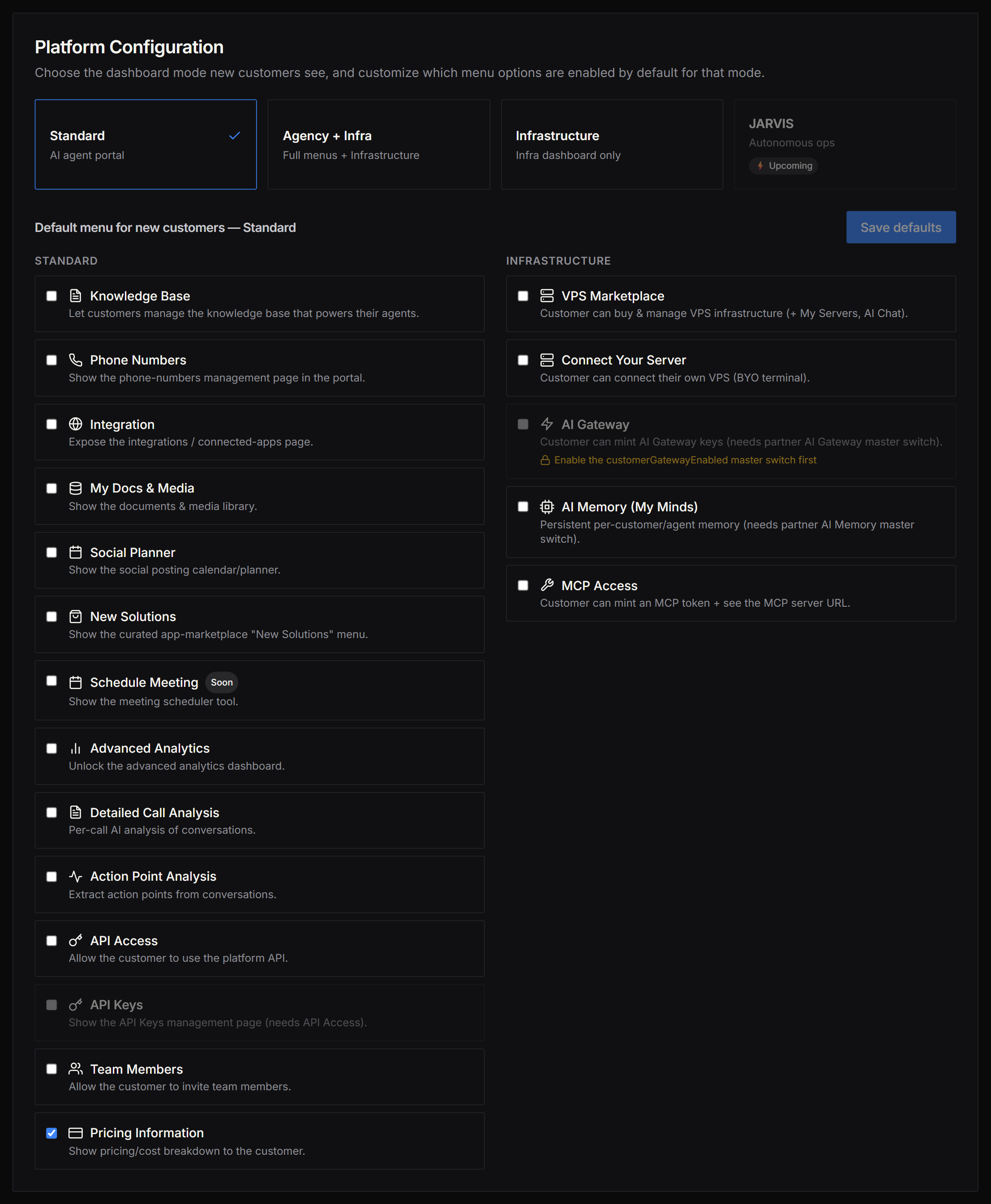
> Choose a dashboard mode for your customers and customize which sidebar menu items are on by default — all from the Platform Configuration section in Partner Settings.
## What Platform Configuration is
The **Platform Configuration** card in Partner Settings gives you two controls in one place:
1. **Dashboard Mode selector** — picks the overall layout and feature set your customers' portal uses.
2. **Default menu customizer** — controls exactly which sidebar menu items new customers have toggled on when they are created.
New customers are automatically seeded with your per-mode defaults the moment they are onboarded, so every customer starts with the right menu from their very first login — no per-customer manual toggling required.
**Rolling out.** Platform Configuration (Dashboard Modes + per-mode default menus) is being deployed in phases. If your Whitelabel settings still show the legacy **Portal Mode** card (Basic / Professional / SaaS) instead of the mode cards below, this feature has not yet reached your account. The related per-experience **Dashboard Experience** picker is already live in Beta — see [Per-Experience Customer Dashboards](/partner-portal/experiences/experience-dashboards).
 ***
## Dashboard Modes
Knotie AI Pro supports four dashboard modes. Three are selectable today; JARVIS is an upcoming tier.
| Mode | Description | Best for |
| ----------------------- | ----------------------------------------------------------------------- | ------------------------------------------------------------------- |
| **Standard** | AI-agent portal — the default, focused customer experience. | Partners that purely resell AI voice/chat agents. |
| **Agency + Infra** | Full menus plus the Infrastructure Dashboard under Management. | Partners reselling both AI agents and VPS / managed infrastructure. |
| **Infrastructure** | Infrastructure Dashboard replaces the standard AI-agent menus entirely. | Partners whose primary offering is managed infrastructure / VPS. |
| **JARVIS** ⚡ *Upcoming* | Autonomous operations mode (in development — not yet available). | Reserved for the future JARVIS platform tier. |
Only one mode is active at a time. JARVIS is displayed but disabled — selecting it is not yet possible.
***
## Dashboard Modes
Knotie AI Pro supports four dashboard modes. Three are selectable today; JARVIS is an upcoming tier.
| Mode | Description | Best for |
| ----------------------- | ----------------------------------------------------------------------- | ------------------------------------------------------------------- |
| **Standard** | AI-agent portal — the default, focused customer experience. | Partners that purely resell AI voice/chat agents. |
| **Agency + Infra** | Full menus plus the Infrastructure Dashboard under Management. | Partners reselling both AI agents and VPS / managed infrastructure. |
| **Infrastructure** | Infrastructure Dashboard replaces the standard AI-agent menus entirely. | Partners whose primary offering is managed infrastructure / VPS. |
| **JARVIS** ⚡ *Upcoming* | Autonomous operations mode (in development — not yet available). | Reserved for the future JARVIS platform tier. |
Only one mode is active at a time. JARVIS is displayed but disabled — selecting it is not yet possible.
 ***
## How to set a Dashboard Mode
1. In the Partner Portal sidebar, open **Settings**.
2. Go to **White-Label Portal**.
3. Scroll to (or click) **Platform Configuration** in the Section Navigation Rail.
4. Click the mode card you want — **Standard**, **Agency + Infra**, or **Infrastructure**.
* The selected card shows a check-mark (✓) and a blue border.
* The change is saved immediately when you click.
5. The **Default menu** grid below updates automatically to show the features available for the new mode.
***
## Customizing default menus
Below the mode cards is the **Default menu for new customers** grid. Each item is a sidebar menu entry (or capability flag) that will be toggled on or off for every new customer created under the active mode.
These defaults apply only to **new** customers created after you save. Existing customers keep their individual settings. To change an existing customer's menu, see [Features, Add-ons & Menu Visibility](/partner-portal/customers/features-addons-and-menu-visibility).
### Feature groups
The grid has two columns:
| Column | Contents |
| ------------------ | --------------------------------------------------------------------------------------------------- |
| **Standard** | Menu items available in Standard and Agency + Infra modes. Hidden in Infrastructure-only mode. |
| **Infrastructure** | Items available in all modes (VPS Marketplace, Server Terminal, AI Gateway, AI Memory, MCP Access). |
### Standard features
| Feature | What it gives customers | Available modes |
| -------------------------------- | --------------------------------------------------------------- | ------------------------ |
| Knowledge Base | Manage the knowledge base that powers their agents. | Standard, Agency + Infra |
| Phone Numbers | Phone-number management page. | Standard, Agency + Infra |
| Integration | Connected-apps / integrations page. | Standard, Agency + Infra |
| My Docs & Media | Documents and media library. | Standard, Agency + Infra |
| Social Planner | Social posting calendar and planner. | Standard, Agency + Infra |
| New Solutions | Curated app-marketplace "New Solutions" menu. | Standard, Agency + Infra |
| Schedule Meeting *(Coming Soon)* | Meeting scheduler tool. | Standard, Agency + Infra |
| Advanced Analytics | Advanced analytics dashboard. | Standard, Agency + Infra |
| Detailed Call Analysis | Per-call AI analysis of conversations. | Standard, Agency + Infra |
| Action Point Analysis | Extracts action points from conversations. | Standard, Agency + Infra |
| API Access | Allows customers to use the platform API. | Standard, Agency + Infra |
| API Keys | API Keys management page. Requires **API Access** to be on. | Standard, Agency + Infra |
| Team Members | Lets customers invite team members. | Standard, Agency + Infra |
| Pricing Information | Shows pricing / cost breakdown to the customer. Default **on**. | Standard, Agency + Infra |
### Infrastructure features
| Feature | What it gives customers | Partner gate required |
| -------------------- | --------------------------------------------------- | --------------------------------------- |
| VPS Marketplace | Buy and manage VPS instances (My Servers, AI Chat). | — |
| Connect Your Server | Connect a BYO VPS via the terminal. | — |
| AI Gateway | Mint AI Gateway keys and manage credit budgets. | AI Gateway master switch must be **on** |
| AI Memory (My Minds) | Persistent per-customer/agent memory. | AI Memory master switch must be **on** |
| MCP Access | Mint MCP tokens and view the MCP server URL. | — |
### Partner-gated features
**AI Gateway** and **AI Memory** require a partner-level master switch to be on first. If the switch is off, the toggle shows a lock icon (🔒) and cannot be changed:
* **AI Gateway** → enable *AI Gateway* in your partner account settings first.
* **AI Memory** → enable *AI Memory / My Minds* in your partner account settings first.
### Feature dependencies
**API Keys** requires **API Access** to be on — enabling API Keys without API Access has no effect. The UI enforces this automatically: the API Keys toggle is grayed out until API Access is enabled.
### Saving your defaults
After toggling features, click **Save defaults** to persist the profile for the active mode. The button is disabled (grayed out) when there are no unsaved changes.
***
## How to set a Dashboard Mode
1. In the Partner Portal sidebar, open **Settings**.
2. Go to **White-Label Portal**.
3. Scroll to (or click) **Platform Configuration** in the Section Navigation Rail.
4. Click the mode card you want — **Standard**, **Agency + Infra**, or **Infrastructure**.
* The selected card shows a check-mark (✓) and a blue border.
* The change is saved immediately when you click.
5. The **Default menu** grid below updates automatically to show the features available for the new mode.
***
## Customizing default menus
Below the mode cards is the **Default menu for new customers** grid. Each item is a sidebar menu entry (or capability flag) that will be toggled on or off for every new customer created under the active mode.
These defaults apply only to **new** customers created after you save. Existing customers keep their individual settings. To change an existing customer's menu, see [Features, Add-ons & Menu Visibility](/partner-portal/customers/features-addons-and-menu-visibility).
### Feature groups
The grid has two columns:
| Column | Contents |
| ------------------ | --------------------------------------------------------------------------------------------------- |
| **Standard** | Menu items available in Standard and Agency + Infra modes. Hidden in Infrastructure-only mode. |
| **Infrastructure** | Items available in all modes (VPS Marketplace, Server Terminal, AI Gateway, AI Memory, MCP Access). |
### Standard features
| Feature | What it gives customers | Available modes |
| -------------------------------- | --------------------------------------------------------------- | ------------------------ |
| Knowledge Base | Manage the knowledge base that powers their agents. | Standard, Agency + Infra |
| Phone Numbers | Phone-number management page. | Standard, Agency + Infra |
| Integration | Connected-apps / integrations page. | Standard, Agency + Infra |
| My Docs & Media | Documents and media library. | Standard, Agency + Infra |
| Social Planner | Social posting calendar and planner. | Standard, Agency + Infra |
| New Solutions | Curated app-marketplace "New Solutions" menu. | Standard, Agency + Infra |
| Schedule Meeting *(Coming Soon)* | Meeting scheduler tool. | Standard, Agency + Infra |
| Advanced Analytics | Advanced analytics dashboard. | Standard, Agency + Infra |
| Detailed Call Analysis | Per-call AI analysis of conversations. | Standard, Agency + Infra |
| Action Point Analysis | Extracts action points from conversations. | Standard, Agency + Infra |
| API Access | Allows customers to use the platform API. | Standard, Agency + Infra |
| API Keys | API Keys management page. Requires **API Access** to be on. | Standard, Agency + Infra |
| Team Members | Lets customers invite team members. | Standard, Agency + Infra |
| Pricing Information | Shows pricing / cost breakdown to the customer. Default **on**. | Standard, Agency + Infra |
### Infrastructure features
| Feature | What it gives customers | Partner gate required |
| -------------------- | --------------------------------------------------- | --------------------------------------- |
| VPS Marketplace | Buy and manage VPS instances (My Servers, AI Chat). | — |
| Connect Your Server | Connect a BYO VPS via the terminal. | — |
| AI Gateway | Mint AI Gateway keys and manage credit budgets. | AI Gateway master switch must be **on** |
| AI Memory (My Minds) | Persistent per-customer/agent memory. | AI Memory master switch must be **on** |
| MCP Access | Mint MCP tokens and view the MCP server URL. | — |
### Partner-gated features
**AI Gateway** and **AI Memory** require a partner-level master switch to be on first. If the switch is off, the toggle shows a lock icon (🔒) and cannot be changed:
* **AI Gateway** → enable *AI Gateway* in your partner account settings first.
* **AI Memory** → enable *AI Memory / My Minds* in your partner account settings first.
### Feature dependencies
**API Keys** requires **API Access** to be on — enabling API Keys without API Access has no effect. The UI enforces this automatically: the API Keys toggle is grayed out until API Access is enabled.
### Saving your defaults
After toggling features, click **Save defaults** to persist the profile for the active mode. The button is disabled (grayed out) when there are no unsaved changes.
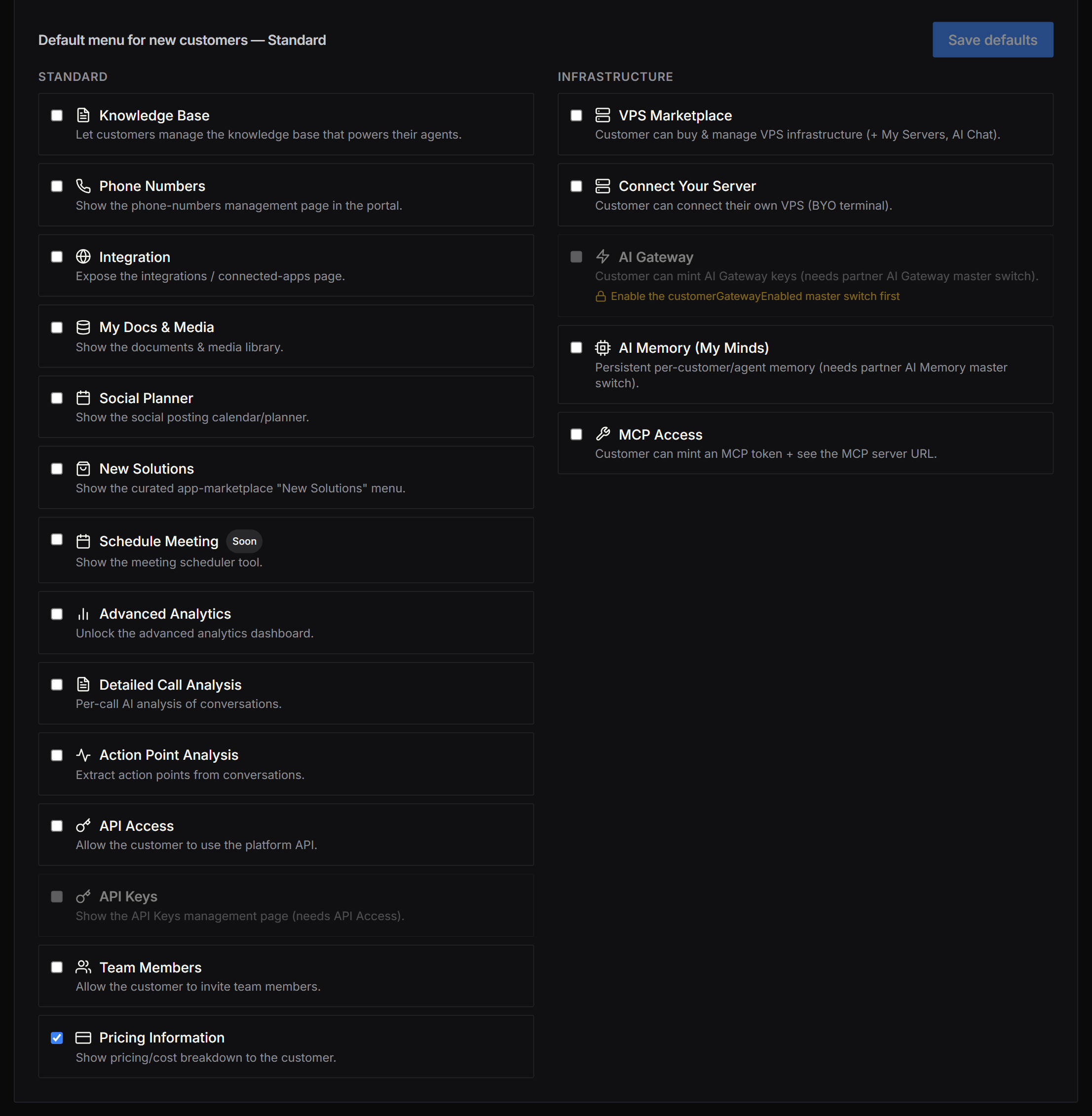 You can configure a separate profile for each mode independently (e.g., a minimal menu for Standard customers and a fuller one for Agency + Infra customers). Switch between mode cards to edit each profile.
***
## How new customers inherit these defaults
When you create a new customer — via **Quick Onboard**, the **Add Customer** modal, or the experience-booking signup flow — the platform resolves the customer's starting feature set in this order:
1. **Catalog baseline** — each feature has a built-in default (most features default **off**; Pricing Information defaults **on**).
2. → **Your per-mode profile** — your saved Platform Configuration settings for the active mode override the baseline.
3. → **Subscription plan overrides** — the customer's plan may enable or lock features.
4. → **Experience-level overrides** — e.g., signing up via the AI Gateway experience enables AI Gateway regardless of the mode profile.
The result is applied to the new customer's portal at creation time. The customer's sidebar reflects these settings from their first login.
***
## Frequently asked questions
No. Switching the active Dashboard Mode or saving a new default profile only affects **new** customers created after the save. Existing customers retain their individual feature settings.
Not via Platform Configuration — that page controls defaults for new customers only. To update existing customers in bulk, use the per-customer [Features, Add-ons & Menu Visibility](/partner-portal/customers/features-addons-and-menu-visibility) panel or contact support for a bulk update.
New customers fall back to the built-in defaults — most features off, with Pricing Information on. Any older AI Gateway or VPS settings on your account are still honored, so nothing breaks if you haven't saved a profile yet.
JARVIS is a future autonomous-operations tier currently in design. There is no ETA yet. The card is shown so you can see where it fits in the mode lineup.
***
## Related pages
* [Partner Settings overview](/partner-portal/settings/overview)
* [Whitelabel Settings](/partner-portal/settings/whitelabel-settings)
* [Features, Add-ons & Menu Visibility](/partner-portal/customers/features-addons-and-menu-visibility)
* [Customer Portal navigation & AI Gateway](/customer-management/client-portal-navigation-and-ai-gateway)
* [Portal Modes](/customer-management/portal-modes)
* [Onboard a Customer](/customer-management/onboard-customer)
You can configure a separate profile for each mode independently (e.g., a minimal menu for Standard customers and a fuller one for Agency + Infra customers). Switch between mode cards to edit each profile.
***
## How new customers inherit these defaults
When you create a new customer — via **Quick Onboard**, the **Add Customer** modal, or the experience-booking signup flow — the platform resolves the customer's starting feature set in this order:
1. **Catalog baseline** — each feature has a built-in default (most features default **off**; Pricing Information defaults **on**).
2. → **Your per-mode profile** — your saved Platform Configuration settings for the active mode override the baseline.
3. → **Subscription plan overrides** — the customer's plan may enable or lock features.
4. → **Experience-level overrides** — e.g., signing up via the AI Gateway experience enables AI Gateway regardless of the mode profile.
The result is applied to the new customer's portal at creation time. The customer's sidebar reflects these settings from their first login.
***
## Frequently asked questions
No. Switching the active Dashboard Mode or saving a new default profile only affects **new** customers created after the save. Existing customers retain their individual feature settings.
Not via Platform Configuration — that page controls defaults for new customers only. To update existing customers in bulk, use the per-customer [Features, Add-ons & Menu Visibility](/partner-portal/customers/features-addons-and-menu-visibility) panel or contact support for a bulk update.
New customers fall back to the built-in defaults — most features off, with Pricing Information on. Any older AI Gateway or VPS settings on your account are still honored, so nothing breaks if you haven't saved a profile yet.
JARVIS is a future autonomous-operations tier currently in design. There is no ETA yet. The card is shown so you can see where it fits in the mode lineup.
***
## Related pages
* [Partner Settings overview](/partner-portal/settings/overview)
* [Whitelabel Settings](/partner-portal/settings/whitelabel-settings)
* [Features, Add-ons & Menu Visibility](/partner-portal/customers/features-addons-and-menu-visibility)
* [Customer Portal navigation & AI Gateway](/customer-management/client-portal-navigation-and-ai-gateway)
* [Portal Modes](/customer-management/portal-modes)
* [Onboard a Customer](/customer-management/onboard-customer)