> ## Documentation Index
> Fetch the complete documentation index at: https://docs.knotie-ai.pro/llms.txt
> Use this file to discover all available pages before exploring further.
# Provider API keys (Settings → Partner API Keys → Platform API)
> Add provider keys (GHL, VAPI, Retell, Ultravox) so you can import agents, run calls, and see analytics.
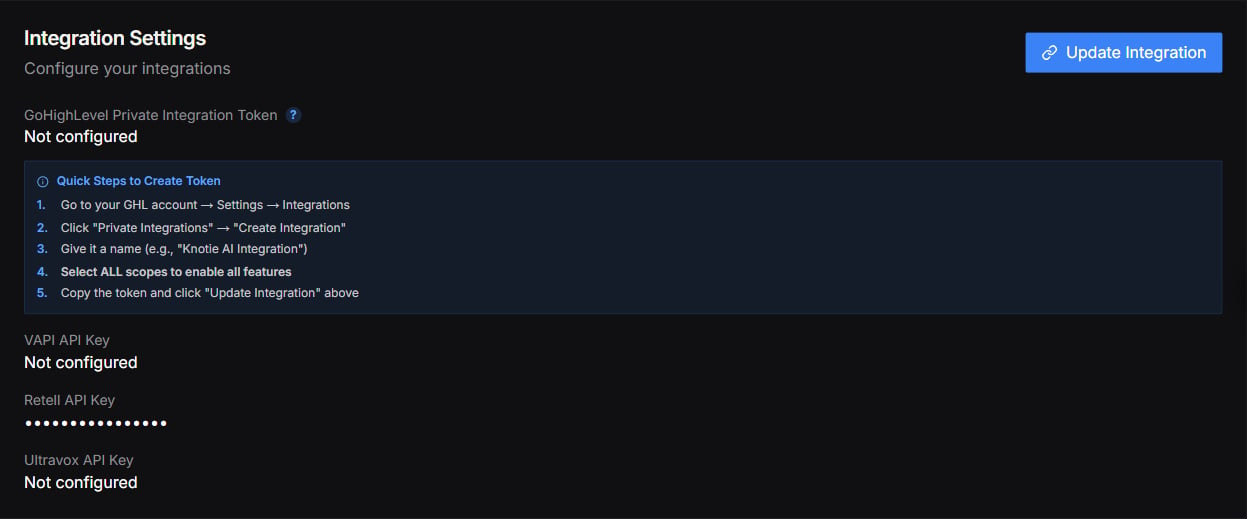
The Partner Settings page was reorganized. There's no longer a separate **Integration Settings** page in the sidebar — instead, provider keys now live under **Settings → Partner API Keys → Platform API** and inside each provider's import screen. (An Integration Settings section still appears on the Manual view of the Settings page; see the screenshot at the bottom.)
## What changed
There used to be a single **Integration Settings** page with one form for all your provider credentials (GoHighLevel Calendar ID and API Key, plus VAPI, Retell, and Ultravox keys). That page is gone — each provider's key is now added where you actually use it.
## Where provider keys live today
| Provider | Where to add the key today |
| ------------------------------------------------------------- | ----------------------------------------------------------------------------------------------------------------------------------------------------------------------------------------------------------- |
| **Platform API key** (`pkt_…`) | Settings → **Partner API Keys** → **Platform API** tab — a general Knotie API key, not tied to a specific provider |
| **AI Gateway key** (`sk-knot-…`) | Settings → **Partner API Keys** → **AI Gateway Beta** tab — an OpenAI-compatible key for calling AI Gateway models |
| **MCP token** (`mt_…`) | AI Agents → **MCP Tokens** (top-level sidebar entry) — for MCP-gateway integrations |
| **VAPI / Retell / Ultravox / ElevenLabs / GHL** provider keys | Entered per-import inside each provider's **Import** modal (VAPI Agents, Retell Agents, Ultravox Agents, ElevenLabs Agents, GHL Agents). The portal validates the key against the provider's API on submit. |
### How keys are checked
When you paste a provider key into an import modal, the portal checks it against that provider before saving:
* **VAPI** keys are verified with VAPI.
* **Retell** keys are verified with Retell.
* **Ultravox** keys are verified with Ultravox.
If a key doesn't check out, you'll see an "invalid API key" message inside the import modal.
## Best practices
* Keep keys in a password manager.
* Rotate keys if a contractor leaves.
* Use separate provider accounts for production vs testing where possible.
* Per-provider keys (VAPI/Retell/Ultravox/ElevenLabs/GHL) are scoped to that provider only — they cannot be used to call another provider's API.
## Screenshots
An **Integration Settings** section still appears on the Manual view of the Settings page, with fields for a GoHighLevel token and VAPI, Retell, and Ultravox keys. It's shown below for reference. For new setups, we recommend adding provider keys in the locations described above (Partner API Keys and each provider's import screen).