> ## Documentation Index
> Fetch the complete documentation index at: https://docs.knotie-ai.pro/llms.txt
> Use this file to discover all available pages before exploring further.
# Customer pricing by tier
> Charge customers more for calls answered by higher-tier agents, instead of one flat rate for every agent.
By default, each customer pays one flat rate per minute, whichever agent answers the call. **Customer Pricing by Tier** lets you multiply that rate by the tier of the agent that took the call — Essentials, Moderate, Premium, or Ultra.
For example, with a base rate of 2 credits per minute and the default multipliers:
| Agent tier | Multiplier | Customer pays |
| - | - | - |
| Essentials | 1× | 2 credits/min |
| Moderate | 2× | 4 credits/min |
| Premium | 3× | 6 credits/min |
| Ultra | 4× | 8 credits/min |
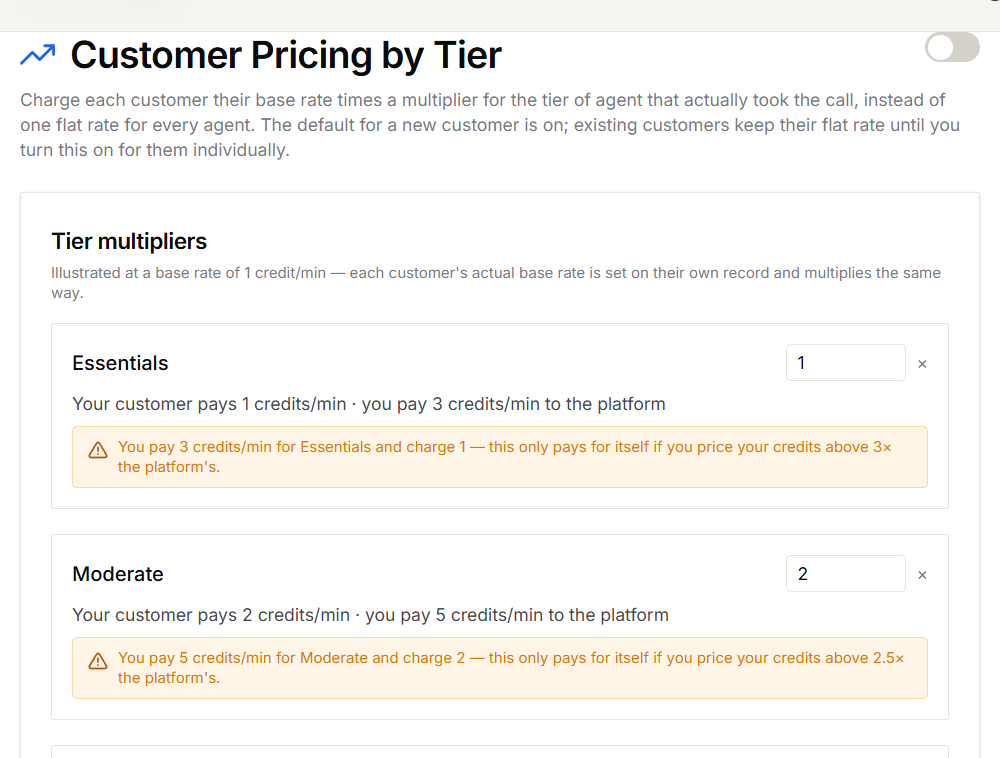 ## Set your multipliers
1. In the Partner Portal, open **Settings → Customer Pricing by Tier**.
2. Under **Tier multipliers**, enter a multiplier for each tier.
3. Select **Save**.
For each tier, the page shows what your customer pays next to what you pay the platform. If you'd charge less than you pay, a warning explains how high your credit price needs to be to cover the difference. This is only a warning — you can still choose to subsidise a tier.
New multipliers apply to new calls. Past calls aren't changed.
## Turn tier pricing on
Use the **Charge customers by agent tier** switch at the top of the page.
* **New customers** start with tier pricing on.
* **Existing customers** keep their flat rate until you turn tier pricing on for them.
## Change it for one customer
1. Open **Customers → Active Customers** and select **Manage** for the customer.
2. Open **Features & Add-ons**.
3. Under **AI Credit Management**, turn **Charge by agent tier** on or off.
4. Select **Save Changes**.
Tier pricing only applies while **AI Credits Enabled** is on for that customer. Turning it off puts the customer back on their flat rate.
## Common questions
The customer pays their flat rate for every call, whichever agent answers.
No. Tiers only exist for Knova agents. Calls handled by other providers are charged at the customer's flat rate.
Yes. Each charge records the agent tier and the multiplier used, so you can explain any charge to a customer.
## Related pages
* [Ultra tier for Knova agents](/agents/knova/ultra-tier)
* [AI credit management](/partner-portal/customers/ai-credit-management)
* [Credits and AI credit billing](/partner-portal/customers/credits-and-ai-credit-management)
* [Integration pricing](/partner-portal/settings/integration-pricing)
This documentation is built and hosted on [Mintlify](https://mintlify.com), a developer documentation platform.
## Set your multipliers
1. In the Partner Portal, open **Settings → Customer Pricing by Tier**.
2. Under **Tier multipliers**, enter a multiplier for each tier.
3. Select **Save**.
For each tier, the page shows what your customer pays next to what you pay the platform. If you'd charge less than you pay, a warning explains how high your credit price needs to be to cover the difference. This is only a warning — you can still choose to subsidise a tier.
New multipliers apply to new calls. Past calls aren't changed.
## Turn tier pricing on
Use the **Charge customers by agent tier** switch at the top of the page.
* **New customers** start with tier pricing on.
* **Existing customers** keep their flat rate until you turn tier pricing on for them.
## Change it for one customer
1. Open **Customers → Active Customers** and select **Manage** for the customer.
2. Open **Features & Add-ons**.
3. Under **AI Credit Management**, turn **Charge by agent tier** on or off.
4. Select **Save Changes**.
Tier pricing only applies while **AI Credits Enabled** is on for that customer. Turning it off puts the customer back on their flat rate.
## Common questions
The customer pays their flat rate for every call, whichever agent answers.
No. Tiers only exist for Knova agents. Calls handled by other providers are charged at the customer's flat rate.
Yes. Each charge records the agent tier and the multiplier used, so you can explain any charge to a customer.
## Related pages
* [Ultra tier for Knova agents](/agents/knova/ultra-tier)
* [AI credit management](/partner-portal/customers/ai-credit-management)
* [Credits and AI credit billing](/partner-portal/customers/credits-and-ai-credit-management)
* [Integration pricing](/partner-portal/settings/integration-pricing)
This documentation is built and hosted on [Mintlify](https://mintlify.com), a developer documentation platform.