> ## Documentation Index
> Fetch the complete documentation index at: https://docs.knotie-ai.pro/llms.txt
> Use this file to discover all available pages before exploring further.
# Prospects
> Track leads going through your SaaS portal onboarding flow (Enterprise feature).
## What Prospects is for
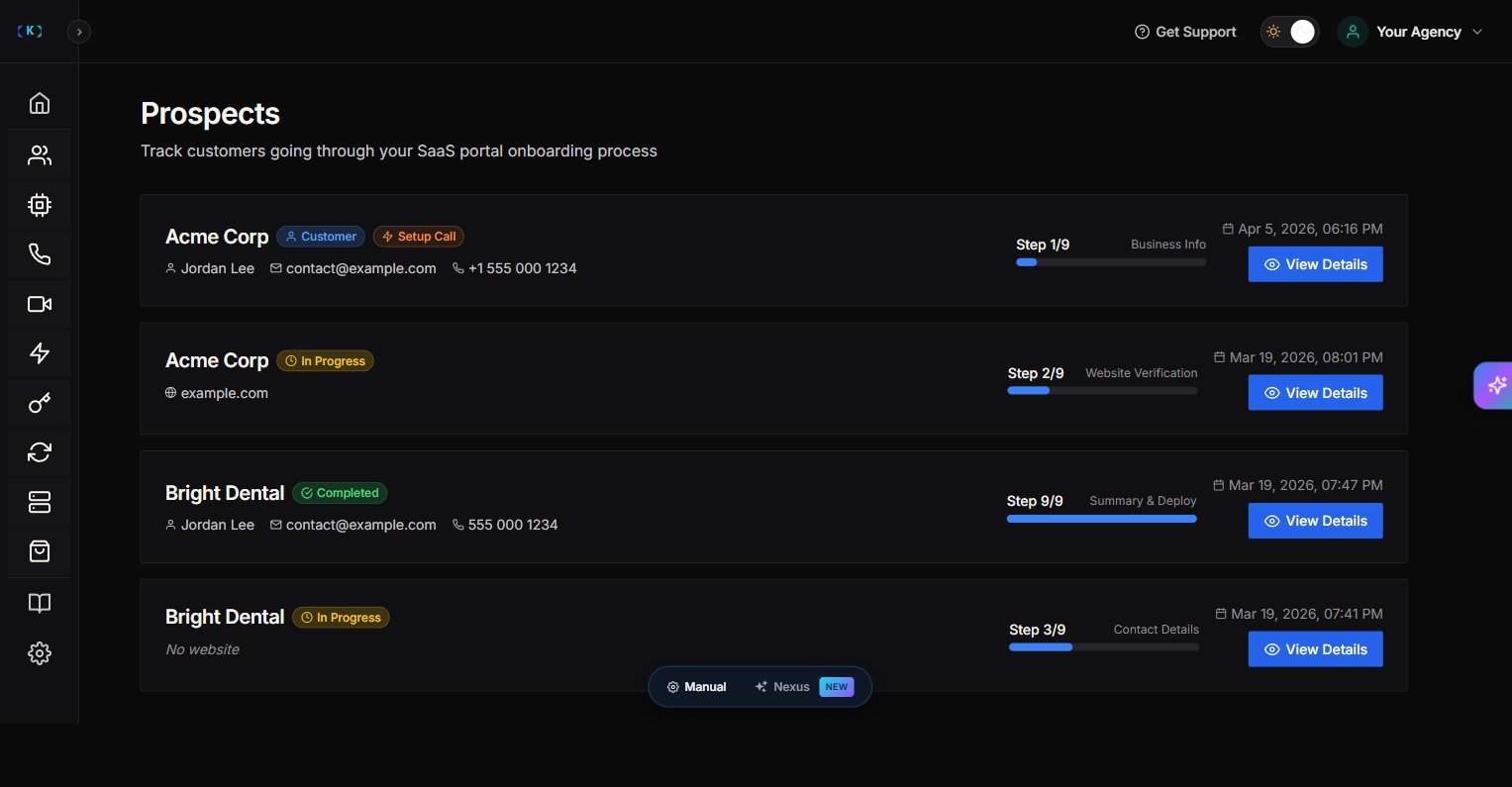
**Prospects** shows people who started your **SaaS portal onboarding** flow but haven’t become full customers yet.
This is useful if you’re running a “productized” offer (agency-as-a-SaaS) and want to:
* See who started onboarding
* See where they dropped off
* Follow up and convert them
## Plan requirement
Prospects is an **Enterprise** feature.
If you’re not on an Enterprise tier, the page shows an upgrade message.
## Where to find it
In the Partner Portal sidebar:
* **Customers**
* **Prospects** (Enterprise)
## What you’ll see
On the Prospects page, you’ll typically see:
* Prospect business name
* Contact details (email/phone)
* Current onboarding step
* Status (in progress vs completed)
## Understanding the onboarding step
The onboarding flow walks prospects through 9 steps:
* Step 1/9 — Business Info
* Step 2/9 — Website Verification
* Step 3/9 — Contact Details
* Step 4/9 — Service Categories
* Step 5/9 — Knowledge Base
* Step 6/9 — Greeting Setup
* Step 7/9 — Information Collection
* Step 8/9 — Communication Settings
* Step 9/9 — **Summary & Deploy**
Steps 4–8 (Service Categories, Knowledge Base, Greeting Setup, Information Collection, Communication Settings) now appear as summary cards inside **Step 9 (Summary & Deploy)** rather than as separate steps. The step indicator shows 1–9.
Use the step name to decide the right follow-up message. A prospect parked on **Summary & Deploy** has filled in everything but hasn't clicked Deploy — usually the highest-value follow-up.
## How to use Prospects (simple workflow)
1. Open **Prospects**.
2. Sort by most recent.
3. Click **View** to open details.
4. Follow up with:
* A short help message (if they’re stuck)
* A quick call invite (if they’re close to completion)
## Viewing business details
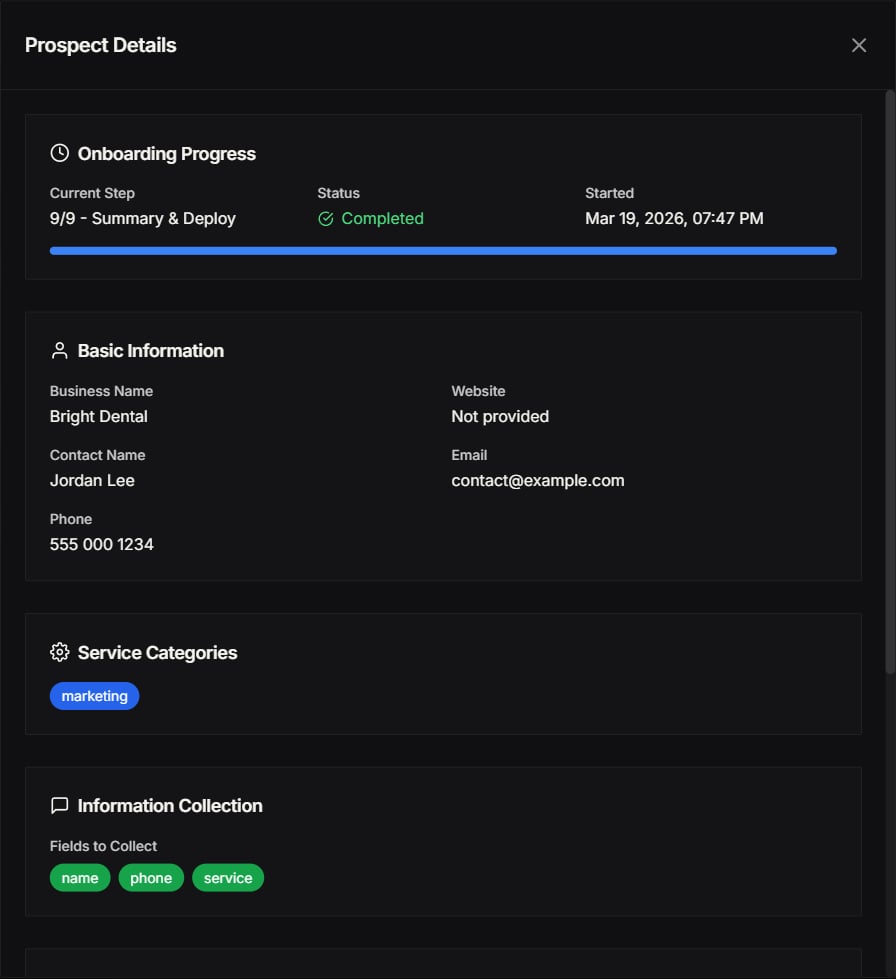
When you click **View** on a prospect, you can see their complete business information:
* Business name and contact details
* Website URL
* Current onboarding step
* Service categories selected
* Any notes or custom fields they've filled in
 ## Free AI Credits allocation
You can allocate **Free AI Credits** to prospects to help them get started without any upfront cost:
1. Open the prospect's details.
2. Find the **Free AI Credits** section.
3. Set the amount of credits you want to allocate.
4. Save changes.
This is useful for:
* **Trial periods** – Let prospects test the AI before committing.
* **Onboarding incentives** – Reduce friction during signup.
* **Demo accounts** – Give sales demos without affecting your main credits.
## Committed Memberships
**Committed Memberships** offer a reduced price rate for prospects who commit to longer-term plans.
If you're interested in offering Committed Memberships to your prospects, please [contact us](mailto:support@knotie-ai.pro) for pricing and setup details.
## Tips
* Treat prospects like "warm leads"—they already showed intent.
* Keep follow-ups helpful and specific ("Need help connecting your knowledge base?").
* Use Free AI Credits strategically to convert high-value prospects.
## Screenshots
## Free AI Credits allocation
You can allocate **Free AI Credits** to prospects to help them get started without any upfront cost:
1. Open the prospect's details.
2. Find the **Free AI Credits** section.
3. Set the amount of credits you want to allocate.
4. Save changes.
This is useful for:
* **Trial periods** – Let prospects test the AI before committing.
* **Onboarding incentives** – Reduce friction during signup.
* **Demo accounts** – Give sales demos without affecting your main credits.
## Committed Memberships
**Committed Memberships** offer a reduced price rate for prospects who commit to longer-term plans.
If you're interested in offering Committed Memberships to your prospects, please [contact us](mailto:support@knotie-ai.pro) for pricing and setup details.
## Tips
* Treat prospects like "warm leads"—they already showed intent.
* Keep follow-ups helpful and specific ("Need help connecting your knowledge base?").
* Use Free AI Credits strategically to convert high-value prospects.
## Screenshots