> ## Documentation Index
> Fetch the complete documentation index at: https://docs.knotie-ai.pro/llms.txt
> Use this file to discover all available pages before exploring further.
# AI Experiences
> Enable and manage one-click AI products like AI Receptionist, AI Business Audit, Resell AI Gateway, and Auto-Install Experiences for your customers.
## Overview
AI Experiences are productized AI solutions that partners can enable for their customers with a single toggle. Each experience is a complete product with its own branded landing page, customer onboarding flow, and agent deployment pipeline.
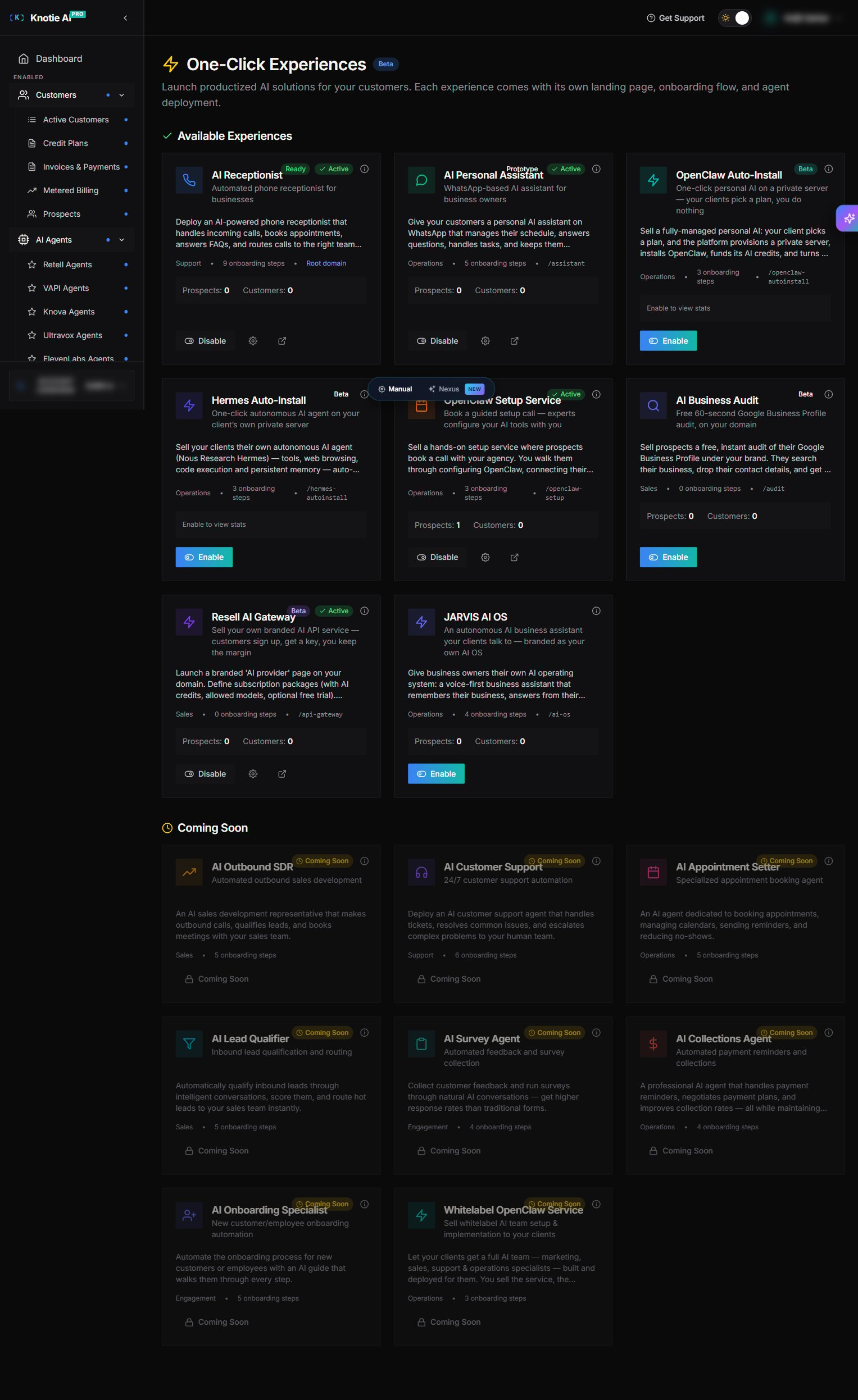 Each card shows the experience's status badge (`Ready` / `Beta` / `Prototype`), category (`Support` / `Operations` / `Sales`), number of onboarding steps, the URL alias (e.g., `/audit`, `/assistant`, `/api-gateway`), live prospect / customer counts, and the **Enable** or **Disable** toggle.
## Experience types
| Name | Status | Description |
| ---------------------- | --------- | ------------------------------------------------------------------------------------------- |
| AI Receptionist | Ready | 24/7 inbound call handling with automatic appointment booking and language routing |
| AI Personal Assistant | Prototype | WhatsApp-native personal EA managing calendar, tasks, and knowledge base |
| OpenClaw Whitelabel | Beta | Full AI Org under the agency brand (marketing, sales, support, ops) |
| OpenClaw Auto-Install | Beta | One-click self-serve install via Telegram, auto-connects Gmail/Calendar/Notion |
| Hermes Auto-Install | Beta | One-click autonomous AI agent (Hermes) on a dedicated private server — chat from the portal |
| OpenClaw Setup Service | Beta | Paid consulting call booking for prospects who need guided setup |
| AI Business Audit | Beta | 60-second self-serve audit with branded report + checkout for packages |
| Resell AI Gateway | Beta | Branded API resell — partners sell access to Claude/GPT/Gemini with their own pricing |
**OpenClaw Auto-Install** and **Hermes Auto-Install** are *auto-provisioning* experiences: when a customer subscribes, the platform automatically provisions a VPS, deploys the agent, and funds AI credits — no manual steps needed. See [Auto-Install Experiences](/partner-portal/experiences/auto-install) for the full setup guide.
## Enable an experience
1. Go to **Experiences** in the Partner Portal sidebar
2. Find the experience you want to enable
3. Click the **Enable** toggle on the experience card
4. For experiences that auto-provision dependencies (like **AI Business Audit** or **Resell AI Gateway**), a confirmation modal lists everything that will turn on — click the confirm button to proceed
### First-time enable
When you enable an experience for the first time:
* The experience is created and turned on
* Some experiences auto-enable related features and surface them in the confirmation modal before you commit
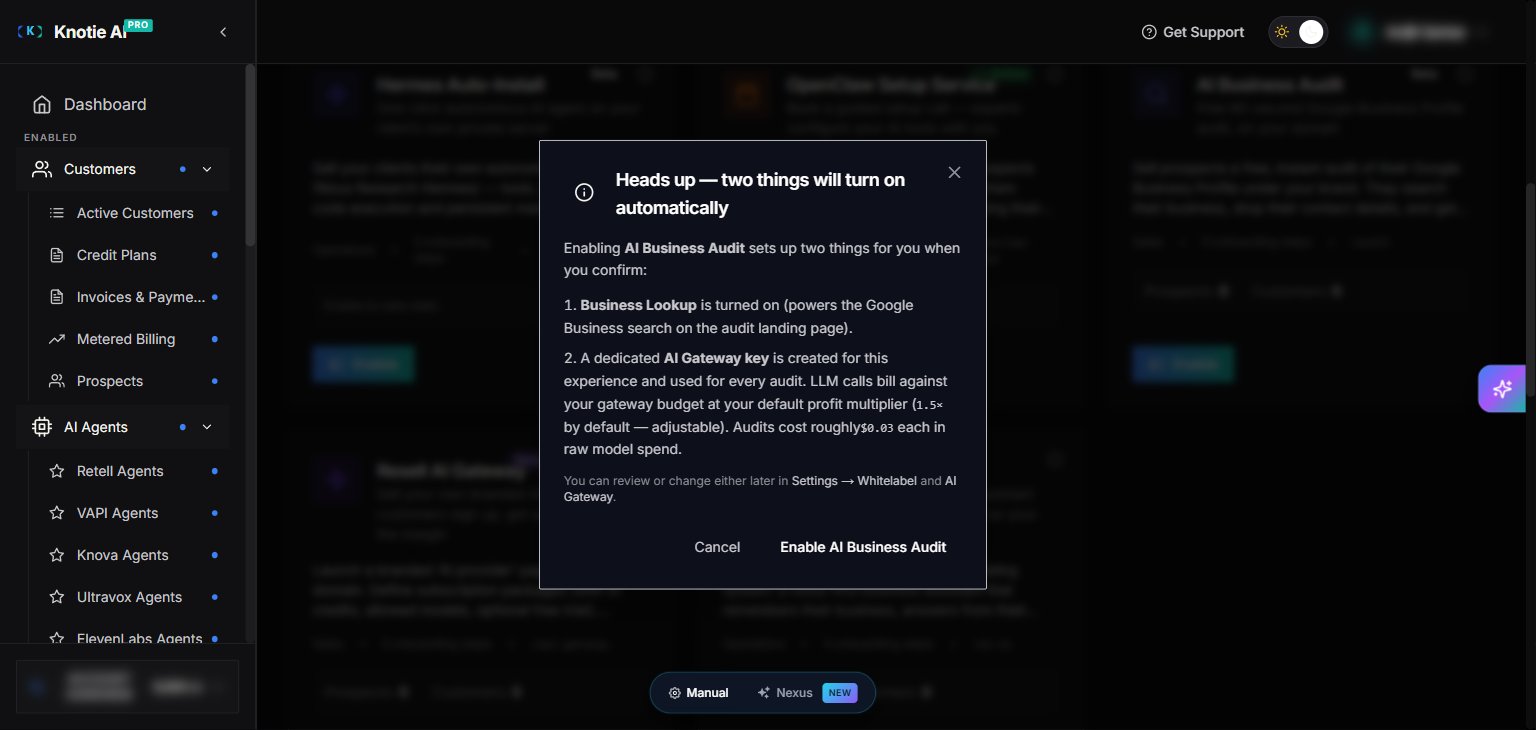
For **AI Business Audit**, the confirmation modal explains the two things that turn on:
* **Business Lookup** is enabled (powers the Google Business Profile search on the audit landing page)
* A dedicated **AI Gateway key** is created for the experience — every audit's LLM calls bill against your gateway budget at your default profit multiplier (`1.5×` by default, adjustable). Audits cost roughly **\$0.03** each in raw model spend.
Both can be reviewed or changed later under **Settings → Whitelabel** and **AI Gateway**.
Each card shows the experience's status badge (`Ready` / `Beta` / `Prototype`), category (`Support` / `Operations` / `Sales`), number of onboarding steps, the URL alias (e.g., `/audit`, `/assistant`, `/api-gateway`), live prospect / customer counts, and the **Enable** or **Disable** toggle.
## Experience types
| Name | Status | Description |
| ---------------------- | --------- | ------------------------------------------------------------------------------------------- |
| AI Receptionist | Ready | 24/7 inbound call handling with automatic appointment booking and language routing |
| AI Personal Assistant | Prototype | WhatsApp-native personal EA managing calendar, tasks, and knowledge base |
| OpenClaw Whitelabel | Beta | Full AI Org under the agency brand (marketing, sales, support, ops) |
| OpenClaw Auto-Install | Beta | One-click self-serve install via Telegram, auto-connects Gmail/Calendar/Notion |
| Hermes Auto-Install | Beta | One-click autonomous AI agent (Hermes) on a dedicated private server — chat from the portal |
| OpenClaw Setup Service | Beta | Paid consulting call booking for prospects who need guided setup |
| AI Business Audit | Beta | 60-second self-serve audit with branded report + checkout for packages |
| Resell AI Gateway | Beta | Branded API resell — partners sell access to Claude/GPT/Gemini with their own pricing |
**OpenClaw Auto-Install** and **Hermes Auto-Install** are *auto-provisioning* experiences: when a customer subscribes, the platform automatically provisions a VPS, deploys the agent, and funds AI credits — no manual steps needed. See [Auto-Install Experiences](/partner-portal/experiences/auto-install) for the full setup guide.
## Enable an experience
1. Go to **Experiences** in the Partner Portal sidebar
2. Find the experience you want to enable
3. Click the **Enable** toggle on the experience card
4. For experiences that auto-provision dependencies (like **AI Business Audit** or **Resell AI Gateway**), a confirmation modal lists everything that will turn on — click the confirm button to proceed
### First-time enable
When you enable an experience for the first time:
* The experience is created and turned on
* Some experiences auto-enable related features and surface them in the confirmation modal before you commit
For **AI Business Audit**, the confirmation modal explains the two things that turn on:
* **Business Lookup** is enabled (powers the Google Business Profile search on the audit landing page)
* A dedicated **AI Gateway key** is created for the experience — every audit's LLM calls bill against your gateway budget at your default profit multiplier (`1.5×` by default, adjustable). Audits cost roughly **\$0.03** each in raw model spend.
Both can be reviewed or changed later under **Settings → Whitelabel** and **AI Gateway**.
 ### Gateway key provisioning
If AI Gateway key provisioning fails, you'll see an error banner with a **Retry** button. Clicking it re-triggers the key creation.
## Configure experience settings
Click the **Settings** (gear) button on any enabled experience card to open the configuration page for that experience type.
For **OpenClaw Auto-Install** and **Hermes Auto-Install**, the settings page includes a **Pricing Tiers** editor where you define the VPS spec and AI credit allowance per subscription plan. See [Auto-Install Experiences](/partner-portal/experiences/auto-install) for details.
## View landing page
Click **View Landing Page** (the arrow icon next to the gear) to see the experience on your partner domain:
* Custom domain if configured
* Or `https://{subdomain}.knotie-ai.pro/{alias}`
### Example landing pages
Each enabled experience renders a public landing page on your domain, branded with your partner identity. Two examples below are from a partner's live whitelabel domain:
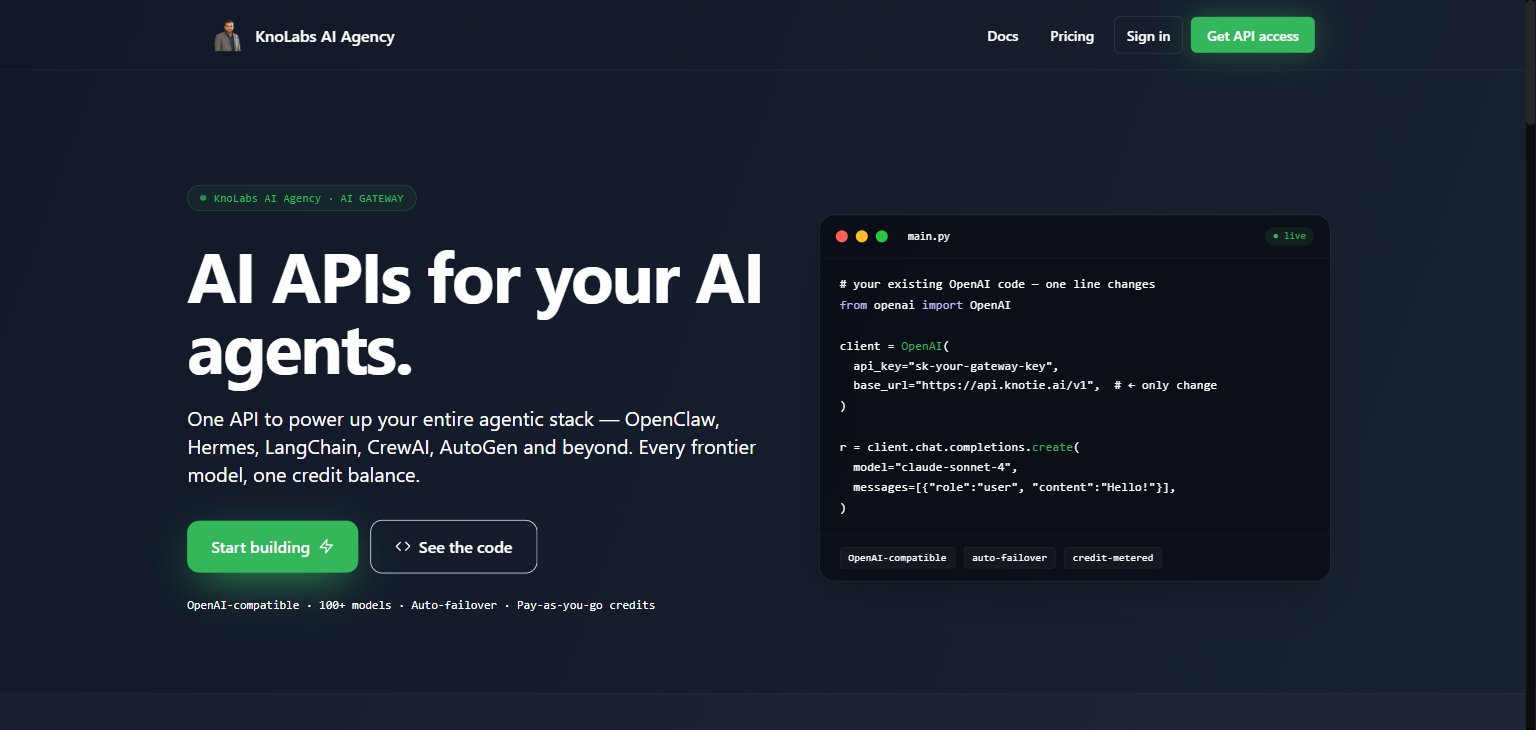
**Resell AI Gateway** — `/{your-domain}/api-gateway`. A branded API-resell storefront where end-users sign up for an API key. Customers self-serve, pick a subscription tier you've defined, get a key, and you keep the margin between their billed rate and your upstream cost.
### Gateway key provisioning
If AI Gateway key provisioning fails, you'll see an error banner with a **Retry** button. Clicking it re-triggers the key creation.
## Configure experience settings
Click the **Settings** (gear) button on any enabled experience card to open the configuration page for that experience type.
For **OpenClaw Auto-Install** and **Hermes Auto-Install**, the settings page includes a **Pricing Tiers** editor where you define the VPS spec and AI credit allowance per subscription plan. See [Auto-Install Experiences](/partner-portal/experiences/auto-install) for details.
## View landing page
Click **View Landing Page** (the arrow icon next to the gear) to see the experience on your partner domain:
* Custom domain if configured
* Or `https://{subdomain}.knotie-ai.pro/{alias}`
### Example landing pages
Each enabled experience renders a public landing page on your domain, branded with your partner identity. Two examples below are from a partner's live whitelabel domain:
**Resell AI Gateway** — `/{your-domain}/api-gateway`. A branded API-resell storefront where end-users sign up for an API key. Customers self-serve, pick a subscription tier you've defined, get a key, and you keep the margin between their billed rate and your upstream cost.
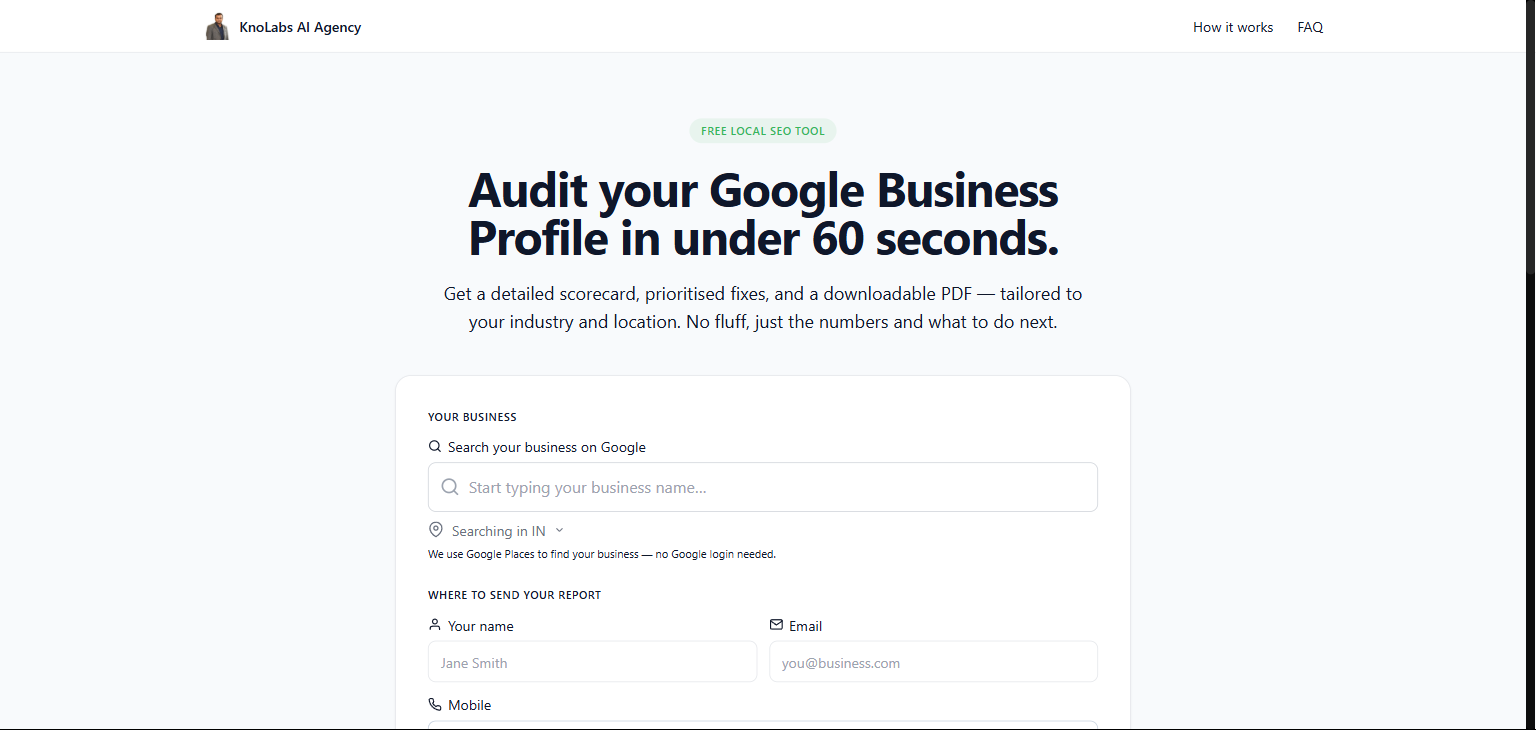
 **AI Business Audit** — `/{your-domain}/audit`. A self-serve Google Business Profile audit form: prospects search their business, drop name / email / mobile, and get a PDF scorecard emailed to them. Each completed audit produces a Knotie prospect for your funnel.
 ## View stats
Each experience shows:
* **Total Prospects** — number of prospects for this experience
* **Total Customers** — number of customers using this experience
## Pricing and costs
AI Business Audit calls cost approximately **\$0.03** in raw model spend per audit. This is billed against your AI Gateway budget at your profit multiplier (default 1.5x).
For Auto-Install Experiences, you set the subscription price per tier. AI credits included in each tier are funded from your gateway budget when a customer subscribes and refilled monthly. See [Auto-Install Experiences → Ongoing billing](/partner-portal/experiences/auto-install#ongoing-billing).
## Access control
| Plan | Access |
| ------------------------ | -------------------------------------------------------------------------- |
| Enterprise / Manual SaaS | Always can create |
| Free Forever | Must have entitlement for the experience type, otherwise see upgrade modal |
| Other plans | See standard upgrade modal |
## Next steps
* [Auto-Install Experiences](/partner-portal/experiences/auto-install) — full setup guide for OpenClaw Auto-Install and Hermes Auto-Install
* [AI Receptionist Setup](/agents/knova/knova-agent) — set up the AI Receptionist agent
* [AI Gateway](/partner-portal/ai-gateway) — manage your API keys and budgets
* [Partner Portal Overview](/partner-portal/overview) — explore other features
## View stats
Each experience shows:
* **Total Prospects** — number of prospects for this experience
* **Total Customers** — number of customers using this experience
## Pricing and costs
AI Business Audit calls cost approximately **\$0.03** in raw model spend per audit. This is billed against your AI Gateway budget at your profit multiplier (default 1.5x).
For Auto-Install Experiences, you set the subscription price per tier. AI credits included in each tier are funded from your gateway budget when a customer subscribes and refilled monthly. See [Auto-Install Experiences → Ongoing billing](/partner-portal/experiences/auto-install#ongoing-billing).
## Access control
| Plan | Access |
| ------------------------ | -------------------------------------------------------------------------- |
| Enterprise / Manual SaaS | Always can create |
| Free Forever | Must have entitlement for the experience type, otherwise see upgrade modal |
| Other plans | See standard upgrade modal |
## Next steps
* [Auto-Install Experiences](/partner-portal/experiences/auto-install) — full setup guide for OpenClaw Auto-Install and Hermes Auto-Install
* [AI Receptionist Setup](/agents/knova/knova-agent) — set up the AI Receptionist agent
* [AI Gateway](/partner-portal/ai-gateway) — manage your API keys and budgets
* [Partner Portal Overview](/partner-portal/overview) — explore other features