> ## Documentation Index
> Fetch the complete documentation index at: https://docs.knotie-ai.pro/llms.txt
> Use this file to discover all available pages before exploring further.
# Integration app requests
> Customers can ask for apps they don't have yet, and you get an email with what they need.
When a customer wants an app that isn't available to them, they can ask for it from their **Integration** page. You get an email with the details, so you know exactly which apps your customers want.
## Where customers ask for an app
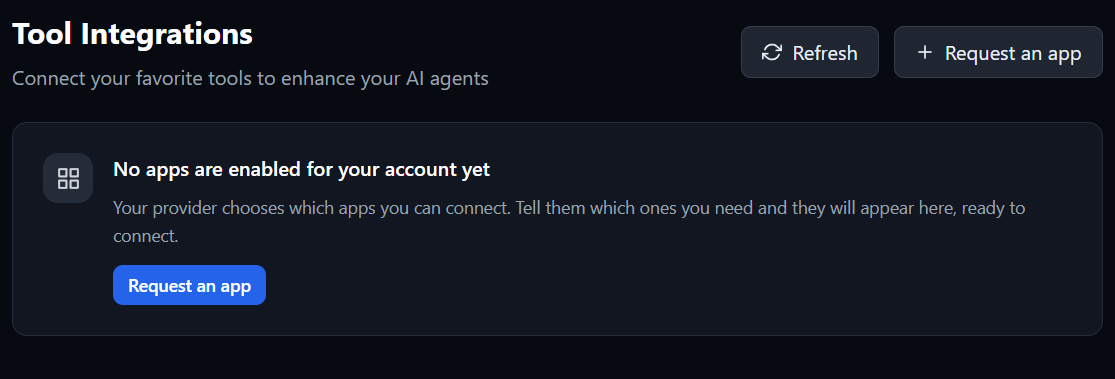
The **Request an app** button appears on the customer's Integration page:
* next to **Refresh**, at the top of **Tool Integrations**, and
* in the middle of the page when no apps are enabled for them yet.
 ## What the customer fills in
 | Field | What the customer enters |
| - | - |
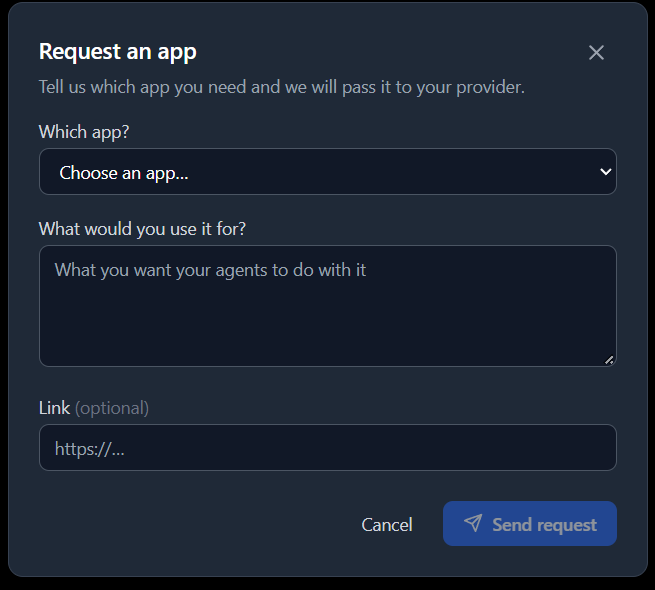
| **Which app?** | An app from the list, or **Something else…** for an app that isn't listed |
| **What would you use it for?** | What they want their agents to do with the app |
| **Link** (optional) | A link to the app or more information |
They then select **Send request**. The list only shows apps the customer can't already use.
## What happens next
Each request gets a reference code, such as `APP-7K3Q9D`, and two emails go out:
* **The customer** gets a confirmation with their reference code. It's sent from your branded email address and doesn't mention your plan.
* **You** get an email saying who asked, which app, what they want it for, and a link to their customer record. If the app isn't included in your own plan, the email says so.
To give the customer the app, add it in **Customers → Manage → Features & Add-ons → Edit Apps**. See [Choose customer integrations](/partner-portal/customers/integration-apps-selection).
## Limits
Each customer can send up to six requests an hour.
## Related pages
* [Choose customer integrations](/partner-portal/customers/integration-apps-selection)
* [Integration pricing](/partner-portal/settings/integration-pricing)
* [Features, add-ons, and menu visibility](/partner-portal/customers/features-addons-and-menu-visibility)
This documentation is built and hosted on [Mintlify](https://mintlify.com), a developer documentation platform.
| Field | What the customer enters |
| - | - |
| **Which app?** | An app from the list, or **Something else…** for an app that isn't listed |
| **What would you use it for?** | What they want their agents to do with the app |
| **Link** (optional) | A link to the app or more information |
They then select **Send request**. The list only shows apps the customer can't already use.
## What happens next
Each request gets a reference code, such as `APP-7K3Q9D`, and two emails go out:
* **The customer** gets a confirmation with their reference code. It's sent from your branded email address and doesn't mention your plan.
* **You** get an email saying who asked, which app, what they want it for, and a link to their customer record. If the app isn't included in your own plan, the email says so.
To give the customer the app, add it in **Customers → Manage → Features & Add-ons → Edit Apps**. See [Choose customer integrations](/partner-portal/customers/integration-apps-selection).
## Limits
Each customer can send up to six requests an hour.
## Related pages
* [Choose customer integrations](/partner-portal/customers/integration-apps-selection)
* [Integration pricing](/partner-portal/settings/integration-pricing)
* [Features, add-ons, and menu visibility](/partner-portal/customers/features-addons-and-menu-visibility)
This documentation is built and hosted on [Mintlify](https://mintlify.com), a developer documentation platform.