> ## Documentation Index
> Fetch the complete documentation index at: https://docs.knotie-ai.pro/llms.txt
> Use this file to discover all available pages before exploring further.
# AI Memory (Minds)
> Give your agents and customers persistent, reasoning-based long-term memory. Manage Minds, store facts, and query them from the Partner Portal.
## Overview
**AI Memory** lets every customer in your portal have a **Mind** — a long-term memory store that your agents can write to, read from, and reason over across sessions. This means your agents remember past conversations, caller preferences, and key facts even after the call ends.
Minds are powered by a hosted long-term memory service that Knotie manages for you — there's nothing extra to set up or sign up for.
 ## How AI Memory is charged
AI Memory uses **dual-pool billing**:
| Who | Pool | When charged |
| -------- | -------------- | ------------------------------------------------------------------------ |
| Partner | Knotie Credits | On every **Remember** or **Ask** operation |
| Customer | AI Credits | On every **Remember** or **Ask** operation (requires AI Credits enabled) |
**Recall** operations are **free** — they never deduct from either pool.
The exact per-operation rate is set by Knotie and can be updated at any time.
If a customer does not have AI Credits enabled, only the partner's Knotie Credits are charged. The partner absorbs the full cost in that case.
## Prerequisites
Before using AI Memory:
1. Your Knotie plan must support AI Memory (check your plan page or contact support).
2. AI Memory must be enabled at the **partner level** (auto-enabled on supported plans; contact support if absent).
3. You must enable AI Memory **per customer** — see [Enabling AI Memory for a customer](#enabling-ai-memory-for-a-customer).
4. Customers who need AI Credits charged must have **AI Credits enabled** on their account.
## Enabling AI Memory for a customer
To turn on AI Memory for a specific customer:
1. In the Partner Portal sidebar, go to **Customers**.
2. Open the customer you want to enable.
3. Click the **Features & Add-ons** tab.
4. Toggle **Enable AI Memory (Mind)** to ON.
5. Click **Save**.
Once enabled, that customer can use the `/whitelabel/memory` page in their portal, and their agents can use memory MCP tools.
## Where to find the AI Memory console
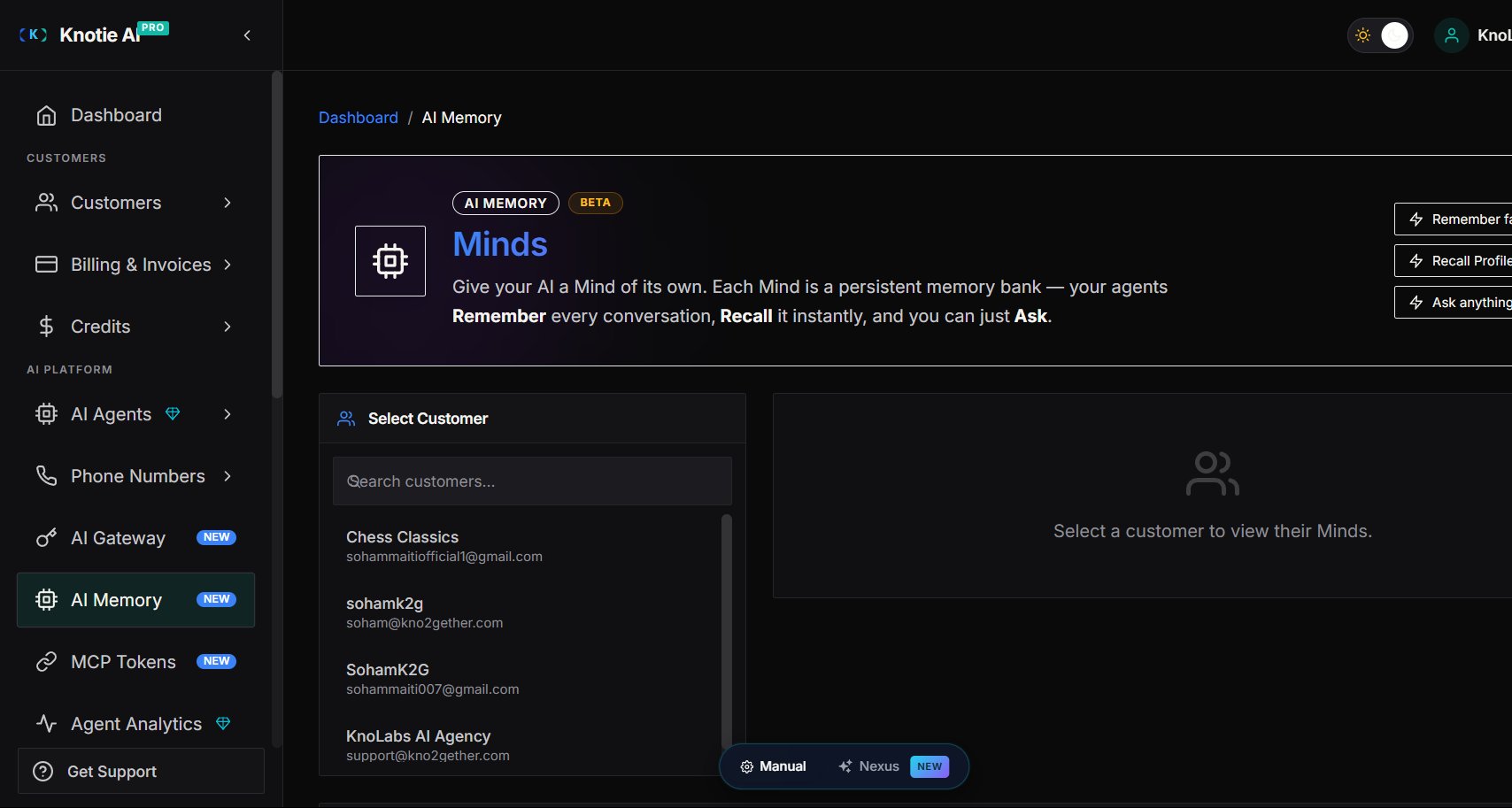
In the Partner Portal sidebar, go to **AI Memory** (or navigate to `/partner/memory`).
## Managing Minds
A **Mind** is a named memory space for a customer. A customer can have multiple Minds — for example, one for their business knowledge and one for caller history.
### View a customer's Minds
1. On the AI Memory page, select a customer from the dropdown.
2. The Minds list shows all Minds for that customer.
### Create a Mind
1. Select a customer.
2. Click **New Mind**.
3. Enter a name and optional description.
4. Click **Save**.
If the selected customer does not have AI Memory enabled, the Minds panel shows **"AI Memory is not enabled for this partner"** with an **Enable AI Memory for *\[customer name]*** button and an "…or manage in Customer settings" link, rather than the Minds list. Use either path to turn the feature on for that customer.
## Memory operations
Once you have a Mind selected, you can perform three types of operations:
### Remember
**Remember** stores a fact or conversation excerpt into the Mind.
1. Select a customer and open a Mind.
2. Type the fact or context in the Remember input (e.g., `"Caller Marco prefers WhatsApp; code LV-7731"`).
3. Click **Remember**.
Charges: **Partner Knotie Credits** + **Customer AI Credits** (if enabled).
### Recall
**Recall** fetches the current Profile, Snapshot, and recent messages stored in the Mind.
1. Select a customer and open a Mind.
2. Click **Recall**.
3. Review the Profile (derived), Snapshot, and message history.
Charges: **Free** — Recall never deducts credits.
The **Profile** section may be empty immediately after writing a new fact. Profile derivation is asynchronous — recall again after a short wait to see the derived profile.
### Ask
**Ask** lets you pose a natural-language question against the Mind using AI reasoning.
1. Select a customer and open a Mind.
2. Type a question (e.g., `"How does Marco prefer to be contacted?"`).
3. Set the **reasoning depth**. The console describes this as an **adjustable depth from minimal → max** — deeper reasoning is more thorough and costs more credits.
4. Click **Ask**.
The answer is drawn from everything stored in the Mind.
Charges: **Partner Knotie Credits** + **Customer AI Credits** (if enabled). Higher reasoning levels cost more.
## Troubleshooting
| Symptom | Likely cause | Fix |
| ------------------------------------------------------------------------------------------ | ----------------------------------------------- | --------------------------------------------------------------------------------------------------------------------------------------------- |
| "AI Memory is not enabled for this partner" / "Enable AI Memory for *\[customer]*" message | AI Memory is OFF for that customer | Click the **Enable AI Memory for *\[customer]*** button on the Minds panel, or toggle the feature ON in the customer's Features & Add-ons tab |
| Recall returns an empty Profile | Profile derivation hasn't run yet | Wait a few seconds and recall again |
| Ask returns "temporarily unavailable" | The memory service is temporarily unreachable | Wait and retry; Recall still works during those periods |
| No customer credits deducted after Remember | Customer does not have AI Credits enabled | Only partner credits were charged; enable AI Credits if dual-pool billing is required |
| Memory actions are blocked or denied | Memory is disabled at partner or customer level | Verify the feature is enabled at both levels |
## Related
* [Customer Portal — My Minds](/customer-management/ai-memory-my-minds)
* [MCP Memory Tools](/api-reference/mcp/memory-tools)
* [AI Credits Management](/partner-portal/customers/ai-credit-management)
* [Credits](/partner-portal/credits)
## How AI Memory is charged
AI Memory uses **dual-pool billing**:
| Who | Pool | When charged |
| -------- | -------------- | ------------------------------------------------------------------------ |
| Partner | Knotie Credits | On every **Remember** or **Ask** operation |
| Customer | AI Credits | On every **Remember** or **Ask** operation (requires AI Credits enabled) |
**Recall** operations are **free** — they never deduct from either pool.
The exact per-operation rate is set by Knotie and can be updated at any time.
If a customer does not have AI Credits enabled, only the partner's Knotie Credits are charged. The partner absorbs the full cost in that case.
## Prerequisites
Before using AI Memory:
1. Your Knotie plan must support AI Memory (check your plan page or contact support).
2. AI Memory must be enabled at the **partner level** (auto-enabled on supported plans; contact support if absent).
3. You must enable AI Memory **per customer** — see [Enabling AI Memory for a customer](#enabling-ai-memory-for-a-customer).
4. Customers who need AI Credits charged must have **AI Credits enabled** on their account.
## Enabling AI Memory for a customer
To turn on AI Memory for a specific customer:
1. In the Partner Portal sidebar, go to **Customers**.
2. Open the customer you want to enable.
3. Click the **Features & Add-ons** tab.
4. Toggle **Enable AI Memory (Mind)** to ON.
5. Click **Save**.
Once enabled, that customer can use the `/whitelabel/memory` page in their portal, and their agents can use memory MCP tools.
## Where to find the AI Memory console
In the Partner Portal sidebar, go to **AI Memory** (or navigate to `/partner/memory`).
## Managing Minds
A **Mind** is a named memory space for a customer. A customer can have multiple Minds — for example, one for their business knowledge and one for caller history.
### View a customer's Minds
1. On the AI Memory page, select a customer from the dropdown.
2. The Minds list shows all Minds for that customer.
### Create a Mind
1. Select a customer.
2. Click **New Mind**.
3. Enter a name and optional description.
4. Click **Save**.
If the selected customer does not have AI Memory enabled, the Minds panel shows **"AI Memory is not enabled for this partner"** with an **Enable AI Memory for *\[customer name]*** button and an "…or manage in Customer settings" link, rather than the Minds list. Use either path to turn the feature on for that customer.
## Memory operations
Once you have a Mind selected, you can perform three types of operations:
### Remember
**Remember** stores a fact or conversation excerpt into the Mind.
1. Select a customer and open a Mind.
2. Type the fact or context in the Remember input (e.g., `"Caller Marco prefers WhatsApp; code LV-7731"`).
3. Click **Remember**.
Charges: **Partner Knotie Credits** + **Customer AI Credits** (if enabled).
### Recall
**Recall** fetches the current Profile, Snapshot, and recent messages stored in the Mind.
1. Select a customer and open a Mind.
2. Click **Recall**.
3. Review the Profile (derived), Snapshot, and message history.
Charges: **Free** — Recall never deducts credits.
The **Profile** section may be empty immediately after writing a new fact. Profile derivation is asynchronous — recall again after a short wait to see the derived profile.
### Ask
**Ask** lets you pose a natural-language question against the Mind using AI reasoning.
1. Select a customer and open a Mind.
2. Type a question (e.g., `"How does Marco prefer to be contacted?"`).
3. Set the **reasoning depth**. The console describes this as an **adjustable depth from minimal → max** — deeper reasoning is more thorough and costs more credits.
4. Click **Ask**.
The answer is drawn from everything stored in the Mind.
Charges: **Partner Knotie Credits** + **Customer AI Credits** (if enabled). Higher reasoning levels cost more.
## Troubleshooting
| Symptom | Likely cause | Fix |
| ------------------------------------------------------------------------------------------ | ----------------------------------------------- | --------------------------------------------------------------------------------------------------------------------------------------------- |
| "AI Memory is not enabled for this partner" / "Enable AI Memory for *\[customer]*" message | AI Memory is OFF for that customer | Click the **Enable AI Memory for *\[customer]*** button on the Minds panel, or toggle the feature ON in the customer's Features & Add-ons tab |
| Recall returns an empty Profile | Profile derivation hasn't run yet | Wait a few seconds and recall again |
| Ask returns "temporarily unavailable" | The memory service is temporarily unreachable | Wait and retry; Recall still works during those periods |
| No customer credits deducted after Remember | Customer does not have AI Credits enabled | Only partner credits were charged; enable AI Credits if dual-pool billing is required |
| Memory actions are blocked or denied | Memory is disabled at partner or customer level | Verify the feature is enabled at both levels |
## Related
* [Customer Portal — My Minds](/customer-management/ai-memory-my-minds)
* [MCP Memory Tools](/api-reference/mcp/memory-tools)
* [AI Credits Management](/partner-portal/customers/ai-credit-management)
* [Credits](/partner-portal/credits)