> ## Documentation Index
> Fetch the complete documentation index at: https://docs.knotie-ai.pro/llms.txt
> Use this file to discover all available pages before exploring further.
# AI Memory: Kick off a Mind & connect agents
> Seed a new Mind with starter facts using the Kick off wizard, then connect the Mind to your MCP-aware agents so they Remember, Recall, and Ask across sessions.
This page covers two features that build on top of the core Minds system: the **Kick off** wizard and the **Connect to agents** modal. If you haven't set up AI Memory yet, start with [AI Memory overview](/partner-portal/ai-memory).
## Kick off a Mind
A brand-new Mind is empty — Recall and Ask have nothing to work from. **Kick off** is a short guided wizard that collects a few stable facts about the customer (or agent) and remembers them in one go, so the very first interaction is useful.
### Where to find it
Select a Mind first, then use the **Kick off** button on the Mind detail panel:
* **Partner portal** — `/partner/memory` → select a customer → select a Mind → **Kick off**.
* **Customer portal** — `/whitelabel/memory` → select a Mind → **Kick off**.
 ### How it works
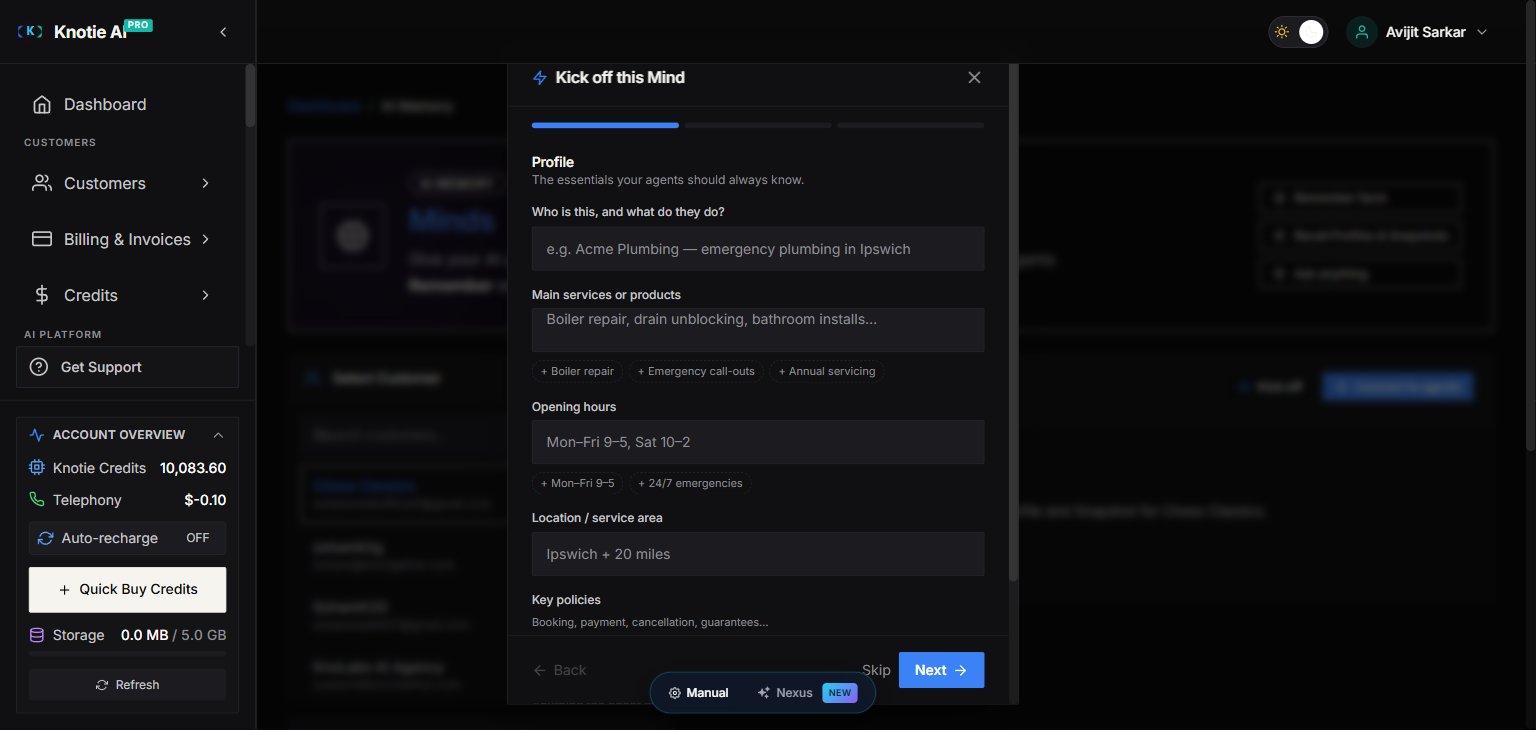
The wizard — titled **Kick off this Mind** — is a **3-step stepper**:
1. **Profile** — *"The essentials your agents should always know."* Questions cover identity and what they do, main services or products, opening hours, location / service area, key policies, and anything the agent must always or never do.
2. **Preferences** — *"How your Mind should communicate."* Pick a preferred tone (Friendly / Professional / Warm / Concise), best times or channels to reach them, language or accessibility needs, and when it should hand off to a human (Urgent issues / Billing / Complaints / Anything unusual).
3. **Review & remember** — *"These facts will be saved into the Mind. Go back to edit anything."* A summary of everything you answered. Click **Remember facts** to store them all in one operation.
Navigation buttons are **Back**, **Skip**, and **Next** (the Next button becomes **Review** on the Preferences step).
#### Design notes
* **Entirely optional** — every question can be skipped. If you reach Review without answering anything, it shows *"Nothing to save yet — go back and answer a few questions."*
* **Choice questions** render as clickable chips (e.g. tone, hand-off triggers) — no typing required.
* **Text questions** show a short input with example chips you can click to insert common answers (e.g. *+ Boiler repair*, *+ Mon–Fri 9–5*).
* Questions adapt to the Mind's **scope** — a Customer Mind asks about the business; an Agent Mind asks about the agent's role and boundaries.
**Remember facts** charges credits, the same as any [Remember](/partner-portal/ai-memory#remember) operation (partner Knotie Credits, plus customer AI Credits when enabled). Skipping the wizard or closing it before Review charges nothing.
## Connect a Mind to your agents
**Connect to agents** generates an MCP connection so any MCP-aware agent — Claude Code, Codex, OpenCode, Cursor, n8n, and more — can Remember, Recall, and Ask against the Mind.
### Where to find it
* **Partner portal** — `/partner/memory` → select a customer → select a Mind → **Connect to agents**.
* **Customer portal** — `/whitelabel/memory` → select a Mind → the **Connect to my agents** card.
### How it works
The wizard — titled **Kick off this Mind** — is a **3-step stepper**:
1. **Profile** — *"The essentials your agents should always know."* Questions cover identity and what they do, main services or products, opening hours, location / service area, key policies, and anything the agent must always or never do.
2. **Preferences** — *"How your Mind should communicate."* Pick a preferred tone (Friendly / Professional / Warm / Concise), best times or channels to reach them, language or accessibility needs, and when it should hand off to a human (Urgent issues / Billing / Complaints / Anything unusual).
3. **Review & remember** — *"These facts will be saved into the Mind. Go back to edit anything."* A summary of everything you answered. Click **Remember facts** to store them all in one operation.
Navigation buttons are **Back**, **Skip**, and **Next** (the Next button becomes **Review** on the Preferences step).
#### Design notes
* **Entirely optional** — every question can be skipped. If you reach Review without answering anything, it shows *"Nothing to save yet — go back and answer a few questions."*
* **Choice questions** render as clickable chips (e.g. tone, hand-off triggers) — no typing required.
* **Text questions** show a short input with example chips you can click to insert common answers (e.g. *+ Boiler repair*, *+ Mon–Fri 9–5*).
* Questions adapt to the Mind's **scope** — a Customer Mind asks about the business; an Agent Mind asks about the agent's role and boundaries.
**Remember facts** charges credits, the same as any [Remember](/partner-portal/ai-memory#remember) operation (partner Knotie Credits, plus customer AI Credits when enabled). Skipping the wizard or closing it before Review charges nothing.
## Connect a Mind to your agents
**Connect to agents** generates an MCP connection so any MCP-aware agent — Claude Code, Codex, OpenCode, Cursor, n8n, and more — can Remember, Recall, and Ask against the Mind.
### Where to find it
* **Partner portal** — `/partner/memory` → select a customer → select a Mind → **Connect to agents**.
* **Customer portal** — `/whitelabel/memory` → select a Mind → the **Connect to my agents** card.
 ### How it works
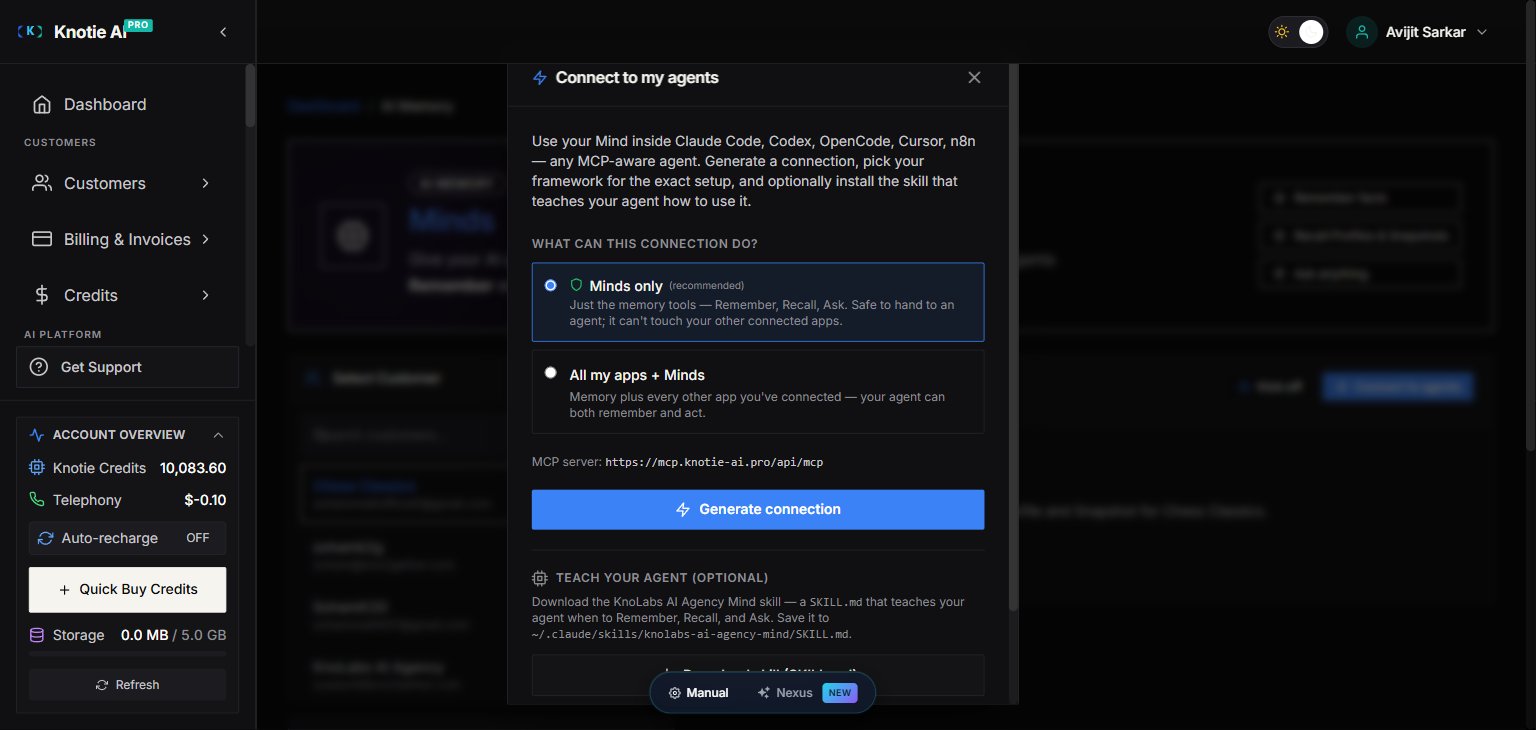
1. **Choose what the connection can do:**
* **Minds only** *(recommended)* — just the memory tools (Remember, Recall, Ask). Safe to hand to an agent; it can't touch your other connected apps.
* **All my apps + Minds** — memory plus every other app you've connected, so the agent can both remember and act.
2. Click **Generate connection**. A one-time bearer token is created and the **Set up your agent** section appears.
3. **Pick your framework** from the tabs — Any MCP agent, Claude Code, Codex CLI, OpenCode, Cursor, VS Code, n8n, OpenClaw, Hermes, or Pi. Each shows the exact setup for that client.
4. **Copy the connection.** You get both the raw details (MCP server URL, `Streamable HTTP` transport, and an `Authorization: Bearer …` header) and a ready-to-paste **`mcpServers` config (JSON)** block.
The token is **shown once — copy it immediately.** It carries no password and can be revoked anytime from your [MCP tokens](/partner-portal/ai-agents/mcp/tokens).
### Teach your agent (optional)
The modal also offers two optional helpers for Claude Code users:
* **Download skill (SKILL.md)** — a skill file that teaches your agent *when* to Remember, Recall, and Ask. Save it to `~/.claude/skills/-mind/SKILL.md`.
* **Get slash commands (installer)** — installs `:status`, `:remember`, `:recall`, and `:ask` slash commands for the Mind.
### Customer-scoped vs agent-scoped Minds
| Type | Scope | Who can access |
| ----------------- | ----------------------------------- | -------------------------------------- |
| **Customer Mind** | Tied to a customer record | Any agent serving that customer |
| **Agent Mind** | Tied to a specific agent + customer | Only that agent + customer combination |
For most use cases a **Customer Mind** works best — all of a customer's agents share the same memory pool, so facts learned by one agent are available to the others.
## Troubleshooting
| Symptom | Likely cause | Fix |
| -------------------------------------------------------- | -------------------------------------- | ----------------------------------------------------------------------------------------------------------------------------------------------- |
| **Kick off** / **Connect to agents** buttons are missing | No Mind is selected | Select (or create) a Mind from the Minds list first |
| Kick off answers don't appear in Recall | Profile derivation is asynchronous | Wait a few seconds and Recall again |
| Lost the connection token | Tokens are shown only once | Revoke the old token and generate a new connection |
| Agent can't reach memory on calls | AI Memory is disabled for the customer | Enable **AI Memory (Mind)** in the customer's Features & Add-ons (see [AI Memory](/partner-portal/ai-memory#enabling-ai-memory-for-a-customer)) |
## Related pages
* [AI Memory overview](/partner-portal/ai-memory) — enable Memory, create Minds, and use Remember / Recall / Ask
* [Subscription plan features](/partner-portal/settings/subscription-plan-features) — enable AI Memory at the plan tier level
* [MCP tokens](/partner-portal/ai-agents/mcp/tokens) — manage and revoke the tokens that Connect to agents generates
* [MCP memory tools](/api-reference/mcp/memory-tools) — the Remember / Recall / Ask tools your agent calls
### How it works
1. **Choose what the connection can do:**
* **Minds only** *(recommended)* — just the memory tools (Remember, Recall, Ask). Safe to hand to an agent; it can't touch your other connected apps.
* **All my apps + Minds** — memory plus every other app you've connected, so the agent can both remember and act.
2. Click **Generate connection**. A one-time bearer token is created and the **Set up your agent** section appears.
3. **Pick your framework** from the tabs — Any MCP agent, Claude Code, Codex CLI, OpenCode, Cursor, VS Code, n8n, OpenClaw, Hermes, or Pi. Each shows the exact setup for that client.
4. **Copy the connection.** You get both the raw details (MCP server URL, `Streamable HTTP` transport, and an `Authorization: Bearer …` header) and a ready-to-paste **`mcpServers` config (JSON)** block.
The token is **shown once — copy it immediately.** It carries no password and can be revoked anytime from your [MCP tokens](/partner-portal/ai-agents/mcp/tokens).
### Teach your agent (optional)
The modal also offers two optional helpers for Claude Code users:
* **Download skill (SKILL.md)** — a skill file that teaches your agent *when* to Remember, Recall, and Ask. Save it to `~/.claude/skills/-mind/SKILL.md`.
* **Get slash commands (installer)** — installs `:status`, `:remember`, `:recall`, and `:ask` slash commands for the Mind.
### Customer-scoped vs agent-scoped Minds
| Type | Scope | Who can access |
| ----------------- | ----------------------------------- | -------------------------------------- |
| **Customer Mind** | Tied to a customer record | Any agent serving that customer |
| **Agent Mind** | Tied to a specific agent + customer | Only that agent + customer combination |
For most use cases a **Customer Mind** works best — all of a customer's agents share the same memory pool, so facts learned by one agent are available to the others.
## Troubleshooting
| Symptom | Likely cause | Fix |
| -------------------------------------------------------- | -------------------------------------- | ----------------------------------------------------------------------------------------------------------------------------------------------- |
| **Kick off** / **Connect to agents** buttons are missing | No Mind is selected | Select (or create) a Mind from the Minds list first |
| Kick off answers don't appear in Recall | Profile derivation is asynchronous | Wait a few seconds and Recall again |
| Lost the connection token | Tokens are shown only once | Revoke the old token and generate a new connection |
| Agent can't reach memory on calls | AI Memory is disabled for the customer | Enable **AI Memory (Mind)** in the customer's Features & Add-ons (see [AI Memory](/partner-portal/ai-memory#enabling-ai-memory-for-a-customer)) |
## Related pages
* [AI Memory overview](/partner-portal/ai-memory) — enable Memory, create Minds, and use Remember / Recall / Ask
* [Subscription plan features](/partner-portal/settings/subscription-plan-features) — enable AI Memory at the plan tier level
* [MCP tokens](/partner-portal/ai-agents/mcp/tokens) — manage and revoke the tokens that Connect to agents generates
* [MCP memory tools](/api-reference/mcp/memory-tools) — the Remember / Recall / Ask tools your agent calls