> ## Documentation Index
> Fetch the complete documentation index at: https://docs.knotie-ai.pro/llms.txt
> Use this file to discover all available pages before exploring further.
# Landing page & revenue calculators
> Explore Knotie AI Pro's redesigned homepage — interactive globe, service drawer, and the 'How do you want to sell AI?' decision tree with built-in revenue calculators.
## Overview
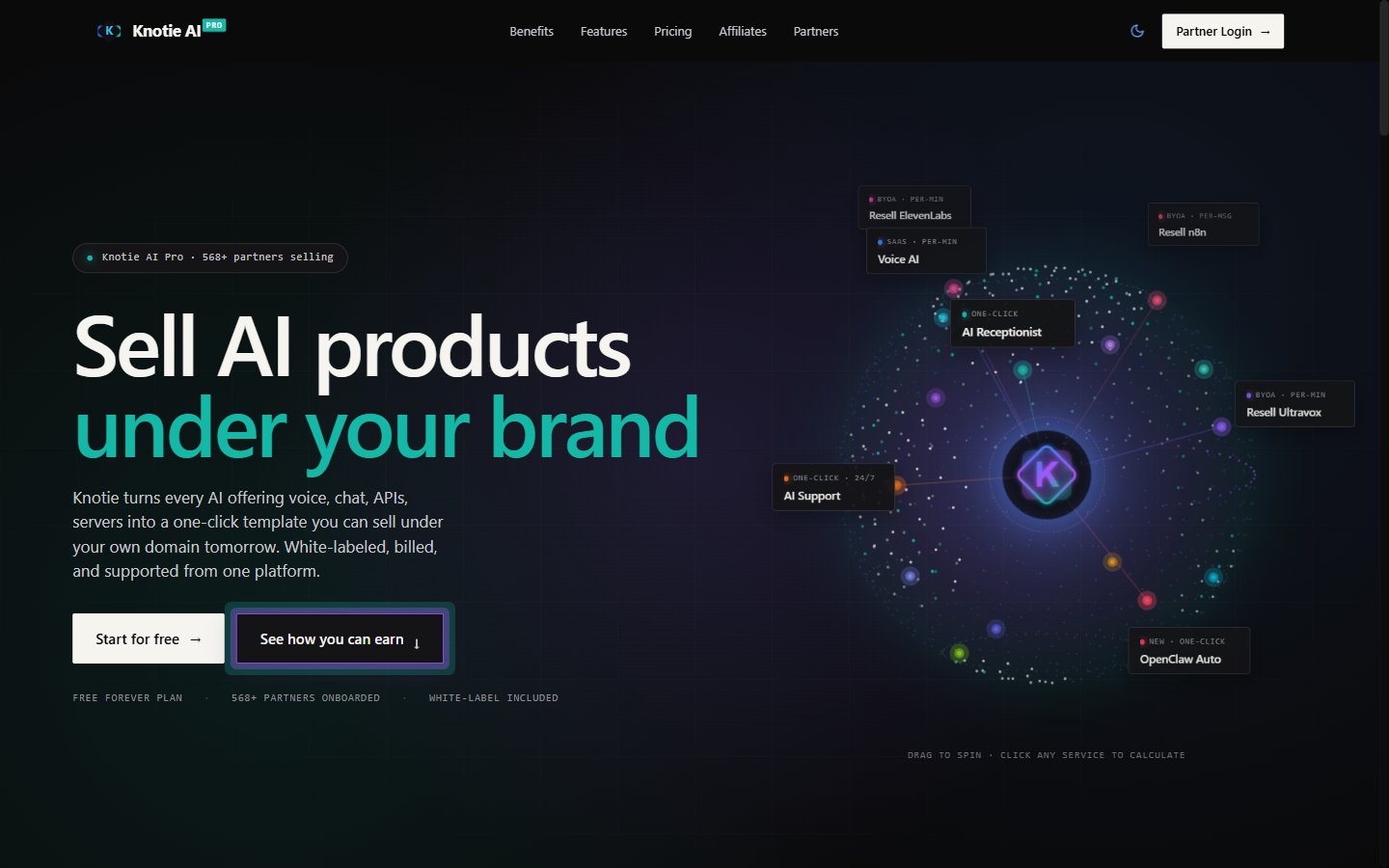
The Knotie AI Pro homepage (`knotie-ai.pro`) received a full hero-section revamp. The new design replaces the previous centered headline layout with an interactive split view:
* **Left panel** — value proposition, headline, and calls to action
* **Right panel** — an animated 3D globe showing every Knotie service as a pinned tile
Clicking any globe tile opens a **Service Drawer** with a live revenue calculator for that service.
Below the hero, the existing decision tree section guides visitors through three paths for selling AI, each with its own calculator.
 ***
## Globe hero
The globe shows nine Knotie services as tiles you can click to explore.
| Service tile | Billing model |
| --------------- | ---------------- |
| Voice AI | Per minute |
| AI Receptionist | One-click |
| Chat AI | Per message |
| Hermes Agent | Whitelabel |
| API Gateway | Per token |
| Business Audit | Lead-gen |
| CRM SaaS | 100% margin |
| VPS Resell | Per server |
| AI Support | One-click · 24/7 |
The globe rotates automatically and you can drag it around to explore.
***
## Globe hero
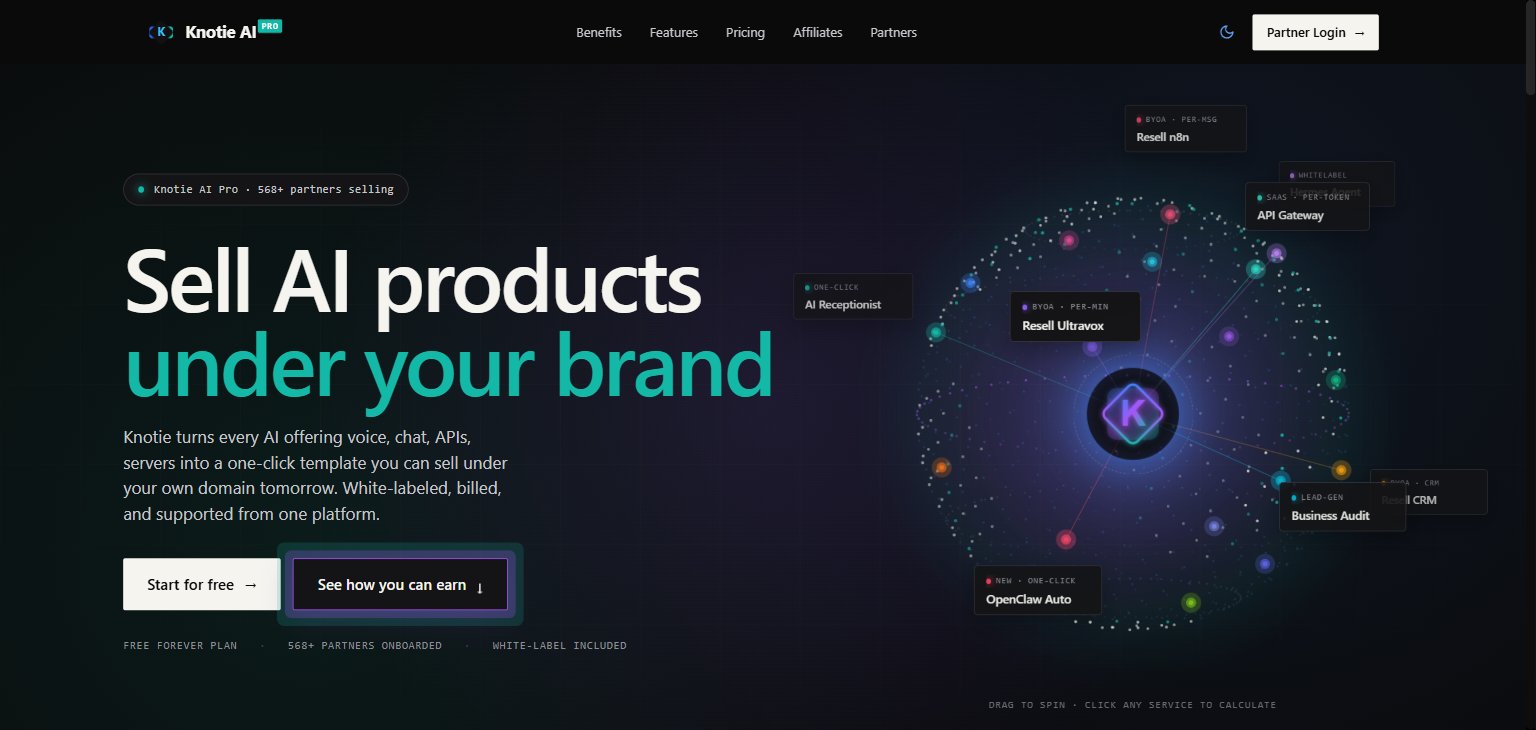
The globe shows nine Knotie services as tiles you can click to explore.
| Service tile | Billing model |
| --------------- | ---------------- |
| Voice AI | Per minute |
| AI Receptionist | One-click |
| Chat AI | Per message |
| Hermes Agent | Whitelabel |
| API Gateway | Per token |
| Business Audit | Lead-gen |
| CRM SaaS | 100% margin |
| VPS Resell | Per server |
| AI Support | One-click · 24/7 |
The globe rotates automatically and you can drag it around to explore.
 ***
## Service drawer
Clicking any tile on the globe slides in a **Service Drawer** from the right edge of the screen. The drawer:
1. Shows the service name, billing model, and a short description
2. Exposes sliders for every revenue input relevant to that service
3. Computes and displays live results as you move each slider
4. Closes via the **×** button, the Escape key, or clicking the overlay
### Example: Voice AI drawer
| Slider | Range | Default |
| ------------------------------- | ------------------- | -------- |
| Number of customers | 1 – 200 | 25 |
| Avg. minutes / customer / month | 50 – 3 000 | 600 |
| Your resale price | 12 ¢/min – 45 ¢/min | 20 ¢/min |
**Displayed results**
| Metric | Example at defaults |
| --------------------- | ------------------- |
| Total minutes / month | 15 000 min |
| Monthly revenue | \$3 000 |
| Wholesale (10 ¢/min) | \$1 500 |
| **Annual profit** | **\$18 000** |
***
## Service drawer
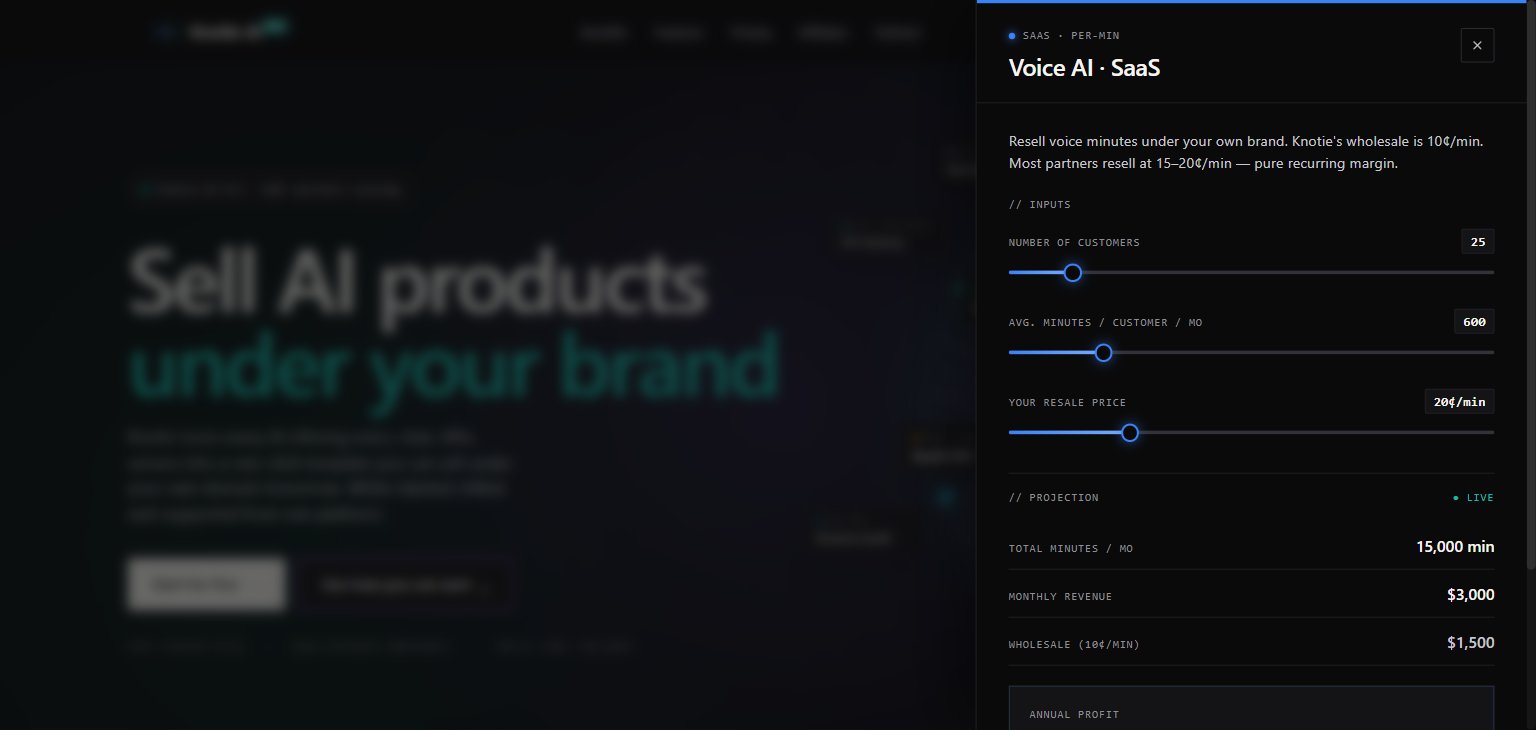
Clicking any tile on the globe slides in a **Service Drawer** from the right edge of the screen. The drawer:
1. Shows the service name, billing model, and a short description
2. Exposes sliders for every revenue input relevant to that service
3. Computes and displays live results as you move each slider
4. Closes via the **×** button, the Escape key, or clicking the overlay
### Example: Voice AI drawer
| Slider | Range | Default |
| ------------------------------- | ------------------- | -------- |
| Number of customers | 1 – 200 | 25 |
| Avg. minutes / customer / month | 50 – 3 000 | 600 |
| Your resale price | 12 ¢/min – 45 ¢/min | 20 ¢/min |
**Displayed results**
| Metric | Example at defaults |
| --------------------- | ------------------- |
| Total minutes / month | 15 000 min |
| Monthly revenue | \$3 000 |
| Wholesale (10 ¢/min) | \$1 500 |
| **Annual profit** | **\$18 000** |
 ***
## "How do you want to sell AI?" — decision tree
Below the globe hero, the **decision tree** section guides visitors through three top-level paths:
### Path 01 — AI as Agency Services
You build, configure, and deliver AI for clients on a project-based or retainer model. Four sub-options:
| Sub-path | Revenue model |
| ------------------------- | ------------------------------------------------------ |
| Voice receptionist setup | Setup fee + monthly managed retainer |
| Chat & support deployment | Setup fee + monthly management |
| Custom AI workflows | Per-project fee + hosting retainer |
| CRM setup & ops | Setup fee + monthly retainer (CRM is \$0 in your plan) |
### Path 02 — AI as SaaS
You resell AI products under your own brand on a recurring subscription. Five sub-options:
| Product | Billing | Wholesale cost |
| ---------------- | ------------ | ------------------------------ |
| Voice AI | Per-minute | 10 ¢/min |
| Chat AI | Per-message | \$3 / 1 000 messages |
| API Gateway | Per-token | Pass-through with margin |
| CRM-as-a-Service | Subscription | \$0 (included in partner plan) |
| VPS Reselling | Per-server | \~\$6/server |
### Path 03 — One-Click Experiences
Ready-made AI products you can enable, white-label, and sell immediately. Each comes with its own landing page, onboarding flow, and agent deployment. Available experiences include AI Receptionist, AI Support, SDR agent, Hermes agent, and Business Audit.
***
## "How do you want to sell AI?" — decision tree
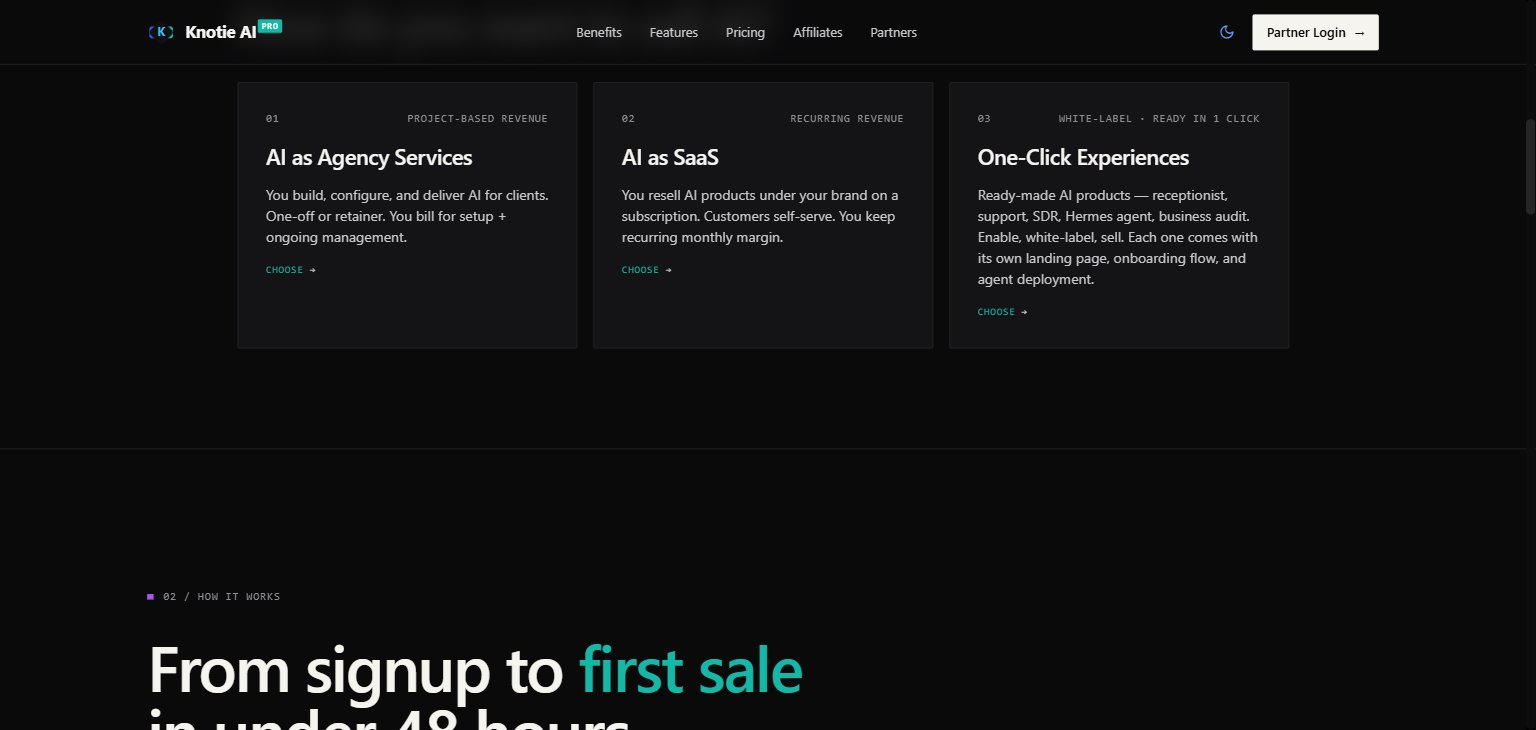
Below the globe hero, the **decision tree** section guides visitors through three top-level paths:
### Path 01 — AI as Agency Services
You build, configure, and deliver AI for clients on a project-based or retainer model. Four sub-options:
| Sub-path | Revenue model |
| ------------------------- | ------------------------------------------------------ |
| Voice receptionist setup | Setup fee + monthly managed retainer |
| Chat & support deployment | Setup fee + monthly management |
| Custom AI workflows | Per-project fee + hosting retainer |
| CRM setup & ops | Setup fee + monthly retainer (CRM is \$0 in your plan) |
### Path 02 — AI as SaaS
You resell AI products under your own brand on a recurring subscription. Five sub-options:
| Product | Billing | Wholesale cost |
| ---------------- | ------------ | ------------------------------ |
| Voice AI | Per-minute | 10 ¢/min |
| Chat AI | Per-message | \$3 / 1 000 messages |
| API Gateway | Per-token | Pass-through with margin |
| CRM-as-a-Service | Subscription | \$0 (included in partner plan) |
| VPS Reselling | Per-server | \~\$6/server |
### Path 03 — One-Click Experiences
Ready-made AI products you can enable, white-label, and sell immediately. Each comes with its own landing page, onboarding flow, and agent deployment. Available experiences include AI Receptionist, AI Support, SDR agent, Hermes agent, and Business Audit.
 ***
## Revenue calculators
Every leaf node in the decision tree opens an inline revenue calculator. All calculators follow the same pattern: adjustable sliders → live computed results table.
**Common outputs across all calculators**
* Monthly revenue (or project revenue)
* Your wholesale cost (what Knotie charges you)
* Annual profit estimate
**VPS Reselling example**
| Slider | Range | Default |
| ----------------- | ----------------- | ------- |
| Number of servers | 1 – 200 | 20 |
| Your resale price | $7 – $30 / server | \$12 |
| Metric | Example at defaults |
| ---------------------- | ------------------- |
| Monthly revenue | \$240 |
| Wholesale (\$6/server) | \$120 |
| **Annual profit** | **\$1 440** |
Calculators are illustrative estimates. Actual margins depend on your plan, usage, and retail pricing.
***
## Revenue calculators
Every leaf node in the decision tree opens an inline revenue calculator. All calculators follow the same pattern: adjustable sliders → live computed results table.
**Common outputs across all calculators**
* Monthly revenue (or project revenue)
* Your wholesale cost (what Knotie charges you)
* Annual profit estimate
**VPS Reselling example**
| Slider | Range | Default |
| ----------------- | ----------------- | ------- |
| Number of servers | 1 – 200 | 20 |
| Your resale price | $7 – $30 / server | \$12 |
| Metric | Example at defaults |
| ---------------------- | ------------------- |
| Monthly revenue | \$240 |
| Wholesale (\$6/server) | \$120 |
| **Annual profit** | **\$1 440** |
Calculators are illustrative estimates. Actual margins depend on your plan, usage, and retail pricing.