> ## Documentation Index
> Fetch the complete documentation index at: https://docs.knotie-ai.pro/llms.txt
> Use this file to discover all available pages before exploring further.
# Social posting calendar
> Schedule and publish social media posts across Facebook, X (Twitter), LinkedIn, Instagram, and TikTok directly from the customer portal.
## What the social posting calendar is for
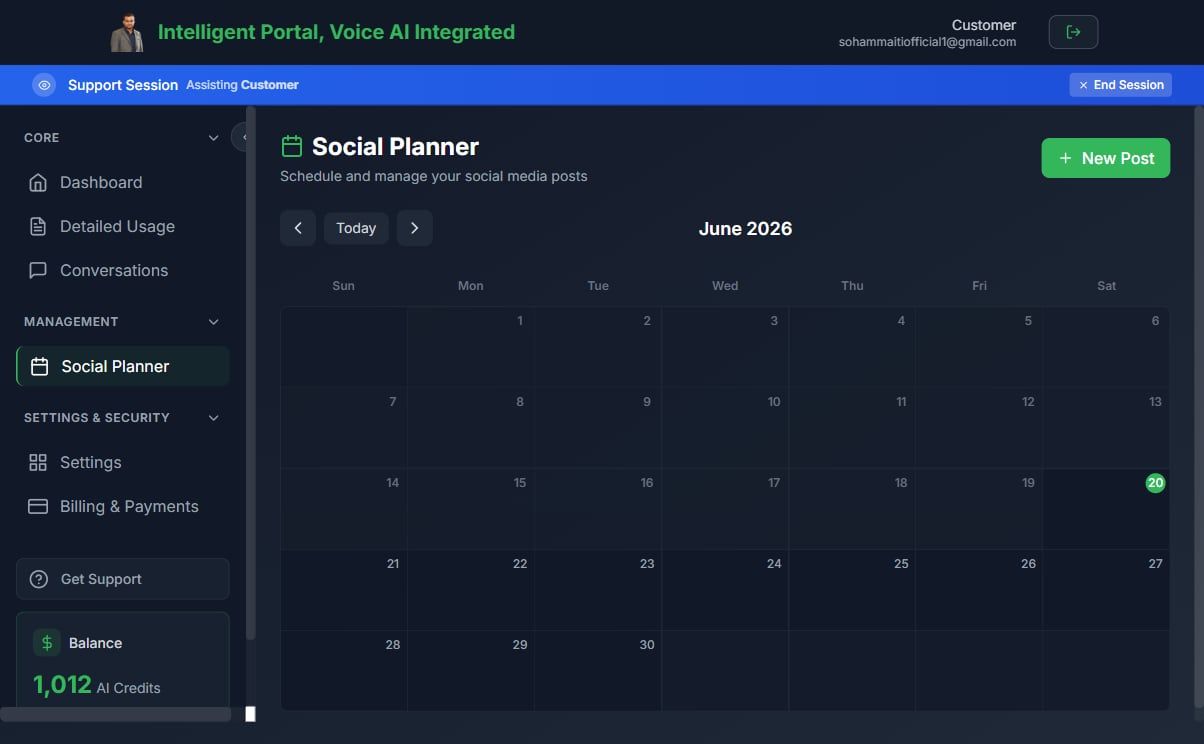
The **Social Posting** section gives customers a calendar where they can write posts, pick platforms, attach media, and schedule or immediately publish across major social networks. Posts go out automatically at the scheduled time — no manual publishing required.
Supported platforms:
* Facebook
* X (Twitter)
* LinkedIn
* Instagram
* TikTok
 ## Prerequisites
1. The customer must have active portal access.
2. The partner must have connected at least one social account via the **Integrations** settings.
3. The customer's **Docs & Media** feature should be enabled if they want to attach images from the media library.
## Scheduling a post
1. In the customer portal, navigate to **Social Posting** (or the calendar view in the marketing section).
2. Click **New Post** or click a day on the calendar.
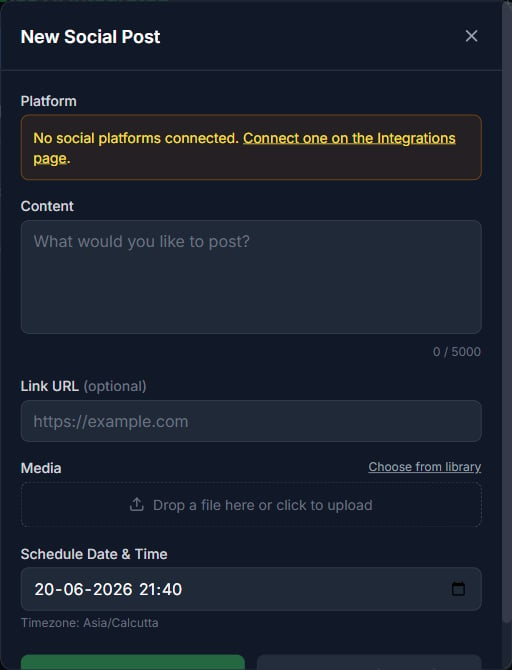
3. Write your post copy in the text editor.
4. Select one or more **platforms** to publish to.
5. Optionally attach an image from the **Docs & Media** library (for platforms that support it).
6. Set a **publish date and time**.
7. Click **Schedule**.
The post appears on the calendar and will be published automatically at the scheduled time.
## Prerequisites
1. The customer must have active portal access.
2. The partner must have connected at least one social account via the **Integrations** settings.
3. The customer's **Docs & Media** feature should be enabled if they want to attach images from the media library.
## Scheduling a post
1. In the customer portal, navigate to **Social Posting** (or the calendar view in the marketing section).
2. Click **New Post** or click a day on the calendar.
3. Write your post copy in the text editor.
4. Select one or more **platforms** to publish to.
5. Optionally attach an image from the **Docs & Media** library (for platforms that support it).
6. Set a **publish date and time**.
7. Click **Schedule**.
The post appears on the calendar and will be published automatically at the scheduled time.
 ## Immediate publishing
If you want to publish now rather than schedule, set the date/time to the current moment (or click **Publish now** if available). The platform checks for due posts every minute or two, so posts set within the next couple of minutes publish near-instantly.
## Editing and deleting scheduled posts
* Click a scheduled post on the calendar to edit its copy, platforms, or schedule time.
* To cancel a post before it publishes, open it and click **Delete**.
* Posts that have already been published cannot be recalled.
## Platform-specific notes
| Platform | Image support | Character limit |
| ----------- | -------------- | --------------- |
| Facebook | Yes | \~63,206 chars |
| X (Twitter) | Yes | 280 chars |
| LinkedIn | Yes | 3,000 chars |
| Instagram | Required | 2,200 chars |
| TikTok | Video (future) | 2,200 chars |
Instagram requires an image or video — text-only posts are rejected by Instagram's API. Attach a file from the [media library](/customer-management/media-library) before scheduling an Instagram post.
## Publishing via agents (MCP)
AI agents that hold a customer-scoped MCP token can also create and schedule posts programmatically using the built-in tools:
* `SOCIAL_POST_PUBLISH` — publish immediately to specified platforms
* `SOCIAL_POST_SCHEDULE` — schedule a post for a future date/time
* `SOCIAL_POST_LIST` — list upcoming scheduled posts
These tools are only exposed to agent tokens with social scope. See [MCP tool modes](/api-reference/mcp/tool-modes) for details on how agents discover and call tools.
## Related pages
* [Docs & Media library](/customer-management/media-library) — Upload images to attach to posts
* [MCP tool modes](/api-reference/mcp/tool-modes) — How agents access social posting tools
* [Features, add-ons, and menu visibility](/partner-portal/customers/features-addons-and-menu-visibility) — Enable social posting for a customer
## Immediate publishing
If you want to publish now rather than schedule, set the date/time to the current moment (or click **Publish now** if available). The platform checks for due posts every minute or two, so posts set within the next couple of minutes publish near-instantly.
## Editing and deleting scheduled posts
* Click a scheduled post on the calendar to edit its copy, platforms, or schedule time.
* To cancel a post before it publishes, open it and click **Delete**.
* Posts that have already been published cannot be recalled.
## Platform-specific notes
| Platform | Image support | Character limit |
| ----------- | -------------- | --------------- |
| Facebook | Yes | \~63,206 chars |
| X (Twitter) | Yes | 280 chars |
| LinkedIn | Yes | 3,000 chars |
| Instagram | Required | 2,200 chars |
| TikTok | Video (future) | 2,200 chars |
Instagram requires an image or video — text-only posts are rejected by Instagram's API. Attach a file from the [media library](/customer-management/media-library) before scheduling an Instagram post.
## Publishing via agents (MCP)
AI agents that hold a customer-scoped MCP token can also create and schedule posts programmatically using the built-in tools:
* `SOCIAL_POST_PUBLISH` — publish immediately to specified platforms
* `SOCIAL_POST_SCHEDULE` — schedule a post for a future date/time
* `SOCIAL_POST_LIST` — list upcoming scheduled posts
These tools are only exposed to agent tokens with social scope. See [MCP tool modes](/api-reference/mcp/tool-modes) for details on how agents discover and call tools.
## Related pages
* [Docs & Media library](/customer-management/media-library) — Upload images to attach to posts
* [MCP tool modes](/api-reference/mcp/tool-modes) — How agents access social posting tools
* [Features, add-ons, and menu visibility](/partner-portal/customers/features-addons-and-menu-visibility) — Enable social posting for a customer